


Visual Studio 2008 as well as the .NET 3.0 extensions for Visual Studio 2005 add several new templatesthat allowyou to quickly create .NET 3.0 items such as WPF forms, Workflows, and WCF services. We’ve used templates such as these since the beginning of time to create traditional application elements such as Windows Forms, Web Forms, and User Controls, so you would think that these are equally great; or would you? Unfortunately, creating WCF projects or project items come with more baggage than you can imagine. They also don’t exactly promote the best practices I feel should be considered when designing WCF services. So if you don’t use the built-in templates to create your services, what do you use? Well keep reading and I’ll show you how to create everything you need manually with ease while maintaining good design and coding practices.
Sometimes, when tools do a lot of work for you, the results may not exactly be the best. In my humble opinion, such is the case with WCF. Now, let me start by saying that WCF is probably one of the absolutely coolest technologies to come out of Microsoft. I think the unified model toward developing message-based applications and service-oriented applications is long overdue in our industry, and I’m glad to see that it came from Microsoft. That being said, I’m not too crazy about the templates that come with Visual Studio 2008 or the 3.0 extensions for Visual Studio 2005. I feel Microsoft could have done a better job toward code separation and the enforcement of good practices; never mind best practices.
Another area where I see developers doing things automatically and falling a bit short is in referencing services from client application. When developers used mainly Web services, the choices were more limited but such is no longer the case. Adding service references automatically may not be the best way to write service consumers.
Fortunately you can easily solve these problems by creating all your service components manually and it’s not even that hard to do.
I don’t want to come across as overly critical or make this sound like a bashing session, because it is definitely not. I merely want to point out a few shortcomings and show you how to overcome them. In doing so, I think you will get a good understanding on how the individual pieces of WCF-based applications work and fit together as well as my recommended assembly separation for WCF-based applications.
I also want to mention that this article assumes some basic knowledge of WCF services and the elements that comprise them. Not too much, just a bit.
So what Exactly Is Wrong?
Anyone who knows me knows that I love getting into political conversations with friends and otherwise (sometimes friends become otherwise because of this); and one of my pet peeves is when politicians criticize and destroy current policy without offering a better solution of how things should be done. Well I won’t fall into the very practices I despise. Instead, I will tell you exactly what I feel is wrong with the WCF-related project and item templates that come with Visual Studio, and then I’ll tell you how I think you can overcome these problems. So look out Congress! Here I come.
The current WCF templates in Visual Studio as well as the Add Service Reference tool suffer from one major problem: they do too much. I think developers would have benefited a lot more from many templates that do less, instead of a few that do a lot. Creating service items automatically create both the contract and the service; two things that should be in separate projects (for reasons I will explain later). Creating service web projects also creates these two items as well as the service host; which I also feel should be its own assembly. Both situations also contribute to the configuration file. While this is good for educational purposes, it can also clutter up an existing clean configuration file. Templates that I feel are missing include ones for individually creating all these elements. In addition, I’d like to see a project template to create a self-host project that’s not IIS-based. As far as the Add Service Reference tool, it also creates too much for you and does not promote good code reuse. Not only does it create proxies for you, but it adds an immense amount of configuration information.
To illustrate what I mean, I’ll walk you through using the WCF templates and tools in order to develop a simple service and client. I’ll later analyze what I see wrong with the results and provide alternatives.
The "Before"
In this section, I’ll develop a quick service and consumer using all the automated templates and tools that Visual Studio provides.
Creating a New Service Project
Visual Studio has three WCF-related project templates. Two are web related; both are called "WCF Service" and do pretty much the same thing. The reason there are two of them is that one is available by selecting "Add New Project" and the other by selecting "Add New Web Site". Both of these project templates create five things for you:
- An IIS-based service host
- References to System.ServiceModel and System.Runtime.Serialization
- An interface-based service contract
- A service class
- Configuration entries in the web.config file
The third project template, called the "WCF Service Library", creates all of the above with the exception of the service host. The project template adds configuration information in an app.config file. I find this a bit misleading because configuration files are only used in the client application and not in a library project. I understand that the addition of this configuration file is educational in order to see what the service parameters will look like, but of course this information would need to eventually be copied to the client project’s configuration file.
I’m going to create a new project of type "WCF Service". This template resides in the Web tree node of the project template dialog. Creating this project provides you with a new web application project that will serve as my service’s host. It also creates a code file called IService1 and a service file called Service1.svc. This latter file is analogous to an old web service’s ASMX file and also carries a code-behind class with it. Since I created a web application project with this project template, the code-behind class for this SVC file is directly under it. If I would have selected "Add New Web Site" and chosen the "WCF Service" project template, the SVC file’s code-behind class as well as the IService1 code file would have been placed in the App_Code folder. Upon first glance, it would seem that the IService1 code file contains the IService1 interface that serves as my service contract, but if you open it up you will see that it contains both the IService1 service contract and a class called CompositeType, which serves as a sample data contract. Here are the contents of the IService1 code file:
[ServiceContract]
public interface IService1
{
    [OperationContract]
    string GetData(int value);
    [OperationContract]
    CompositeType GetDataUsingDataContract(
      CompositeType composite);
    // TODO: Add your service operations here
}
[DataContract]
public class CompositeType
{
    bool boolValue = true;
    string stringValue = "Hello ";
    [DataMember]
    public bool BoolValue
    {
        get { return boolValue; }
        set { boolValue = value; }
    }
    [DataMember]
    public string StringValue
    {
        get { return stringValue; }
        set { stringValue = value; }
    }
}
The Service1.svc file’s code-behind class implements the IService1 interface and provides operation implementations for both defined operations; one that uses the data contract class and one that does not. Look at the code for the actual service.
public class Service1 : IService1
{
   public string GetData(int value)
   {
       return string.Format("You entered: {0}",
         value);
   }
   public CompositeType GetDataUsingDataContract(
      CompositeType composite)
   {
       if (composite.BoolValue)
       {
           composite.StringValue += "Suffix";
       }
       return composite;
   }
}
While I understand that the code samples that the built-in templates provide are merely starting points for making your own services and service elements, I feel strongly that the same could have been achieved with other non-existing templates, such as a "Service Contract" template or a "Data Contract" template.
The Service1.svc file serves as the entry point for this service and looks like this:
<%@ ServiceHost Language="C#" Debug="true"
Service="WcfService1.Service1"
CodeBehind="Service1.svc.cs" %>
In many ways this resembles an old ASMX file, and like an old ASMX file, the only read attribute needed here is the Service attribute, which points to the service class that will be executed when this service entry point is reached.
All of this code I’ve just shown you resides in my new web application project. The web application itself serves as the host for my service and requires a certain amount of configuration. Here’s the configuration that Visual Studio added automatically when I created this project:
<system.serviceModel>
  <services>
    <service name="WcfService1.Service1"
                   behaviorConfiguration =
             "WcfService1.Service1Behavior">
      <endpoint address=""
                      binding ="wsHttpBinding"
                contract="WcfService1.IService1">
       <identity>
          <dns value="localhost"/>
              </identity>
            </endpoint>
      <endpoint address="mex"
                      binding ="mexHttpBinding"
                      contract ="IMetadataExchange"/>
          </service>
        </services>
  <behaviors>
    <serviceBehaviors>
      <behavior name=
                "WcfService1.Service1Behavior">
        <serviceMetadata httpGetEnabled="true"/>
        <serviceDebug
                includeExceptionDetailInFaults ="false"/>
            </behavior>
          </serviceBehaviors>
        </behaviors>
</system.serviceModel>
I won’t over-criticize this configuration because it’s not really overkill. While the minimum that’s necessary in order to host this service is quite less, the extra information that was created for me can be pretty useful. When I mention a service’s minimum configuration, I’m referring to the service’s endpoint(s). The additional information that was added for me allows for the exposure of more detailed error information in cases where the service may fault and the exposure of metadata for use in the case where clients use the "Add Service Reference" option of Visual Studio. Using this feature is one of the habits I want to get you out of in this article, so I prefer not to have this included in my configuration.
I’d prefer to change many things in my solution as it stands so far. In particular I’d make changes for proper assembly separation and a decoupled host, but I’ll address these in extensive detail later in the article. For now let’s continue and consume the service I just wrote, or should I say, "had written for me".
Consuming the Service
Service consumers can be any type of application. As in the case of old fashioned Web services, consumers need proxy classes with which to communicate with the services. Visual Studio makes it easy to have all of this created for you simply by using the "Add Service Reference" option. Once again, like ASMX Web services, you can use this feature to browse to a service and consume it from your client. Later I’ll go over everything I see wrong with this, but I’ll start by actually performing this task and examining what happens.
I created a Windows Forms application with which I will consume the service I created earlier. When I right-click on my project and choose "Add Service Reference" I can browse to the service address (Figure 1) or simply drop-down the "Discover" button and select a service in my solution (where mine happens to reside). Since this technique will create my proxy classes, service contracts, and data contracts for me on my client application, I need to choose a namespace in which to put them. For this example, I’ll leave the default of "ServiceReference1".
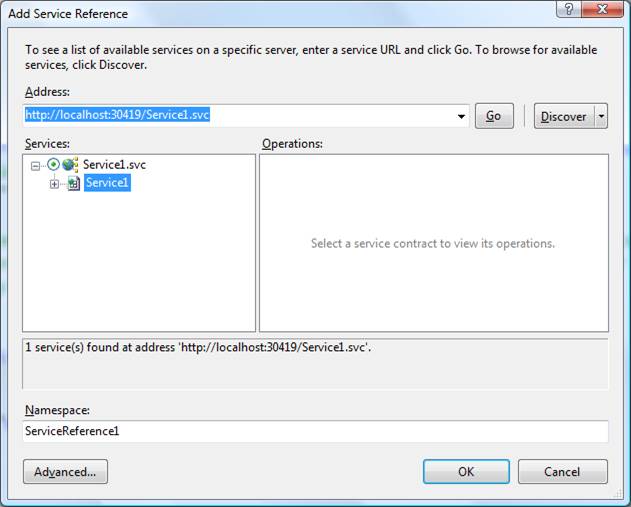
Once I add this reference, Visual Studio creates several items for me in my Windows application. First of all, Visual Studio has added a reference to System.ServiceModel to my project. You’ll also notice that there’s a project tree section now called "Service References" that contains one item called "ServiceReference1". This is the namespace name I provided when I added the reference. Now, I told you that several files would be created for me, but they’re not visible unless I turn on "Show All Files" in my Solutions Explorer. A couple of levels deep in the file tree beneath the "Service References" you’ll find a file called Reference.cs. This file contains the three elements I spoke of earlier. It contains a class that represents the data contract the referenced service uses, an interface representing the service contract, and a proxy class which is used to access the service’s methods. Visual Studio as placed all of these in a namespace that is comprised of the project’s name and the "ServiceReference1" name that was the default in the "Add Reference" dialog. Incidentally, if I add a reference to another service, I cannot reuse the same namespace given this technique. The name of the proxy class created is the name of the service that I referenced followed by the word "Client": Service1Client.
In order for my client application to access the service, it simply needs to instantiate the Service1Client class and access its methods, which are identically named as those defined in the IService1 interface.
The configuration automatically created for me is quite extensive. In fact, Visual Studio creates a binding configuration for me which displays every available attribute with their default value. You can observe this in Listing 1. This is nice if you want to learn about all the attributes, otherwise… well, I’ll get back to this thought later.
The Critique
Using the conventional techniques for creating services and consumers, you can hit the ground running rather quickly; but is this a good thing? Let me analyze what I find wrong with everything that’s just taken place.
- Problem:Data contracts and service contracts should be in their own assembly.Reason:When consumers are .NET, the contracts can be shared by them.
- Problem:Services themselves should be in their own assembly.Reason:Decouples them from the host.
- Problem:Service hosts should be its own project.Reason:See previous reason.
- Problem:Service host’s web.config contains quite a bit.Reason:Metadata endpoint won’t be necessary for the techniques I’m planning to use.
- Problem:Client proxies should be in their own assembly.Reason:More than one client application may want to use these services.
- Problem:Adding a service reference—bad ideaReason:Service and data contracts are duplicated; little control over namespace name; over-bloated configuration.
I’ll revisit each of these and provide alternative approaches in the next section.
The Manual Way… the Right Way
Having Visual Studio do everything for you may seem nice in conversation but as you noticed above, adds a significant amount of extra details to both my service and my consumer that is simply not needed, and in my opinion not recommended. Let’s see how to do it all manually.
Assembly Separation
Now I’ll talk about one of my biggest gripes, first and foremost. Accept the fact that when you design a service-oriented system, you’re going to be dealing with many assemblies. There’s nothing wrong with this in any type of design; so long as there are beneficial reasons for it.
When I design a WCF-based system, I’ll have separate assemblies for the following components:
- Service and data contracts
- Services
- Business/ORM engines
- Service hosts
- Client proxies
- Client applications
After I describe how I like to separate out my WCF-based components, I will give you a step-by-step example by setting up an actual WCF-based application for both the service side and the client side.
The Contracts
The first piece of a service-oriented design I want to pull into its own assembly is the contracts. Though one of the tenets of SOA is that services should be able to service any type of client, as .NET developers I’m willing to say that most of the times (or at least many of the times) you will be dealing with .NET on both sides. In anticipation of this, I like to have both my service contracts and data contracts in their own assemblies. In the previous section I told you that Visual Studio created a copy of these on my consumer. Since I will not be using the same technique to consume a service this time around, I’ll need to create my own copies of the service and data contracts. By placing them in their own assembly I’ll be able to reuse this assembly by both my service and my consumer.
Splitting up your contracts into their own assemblies does not mean you should put every contract in a different assembly, nor does it mean separating service contracts from data contracts. Use logical judgment to decide how the breakaway should happen. Unless I find reason not to, I keep service contracts and their associated data contracts in the same project. I really see no reason to split these up. The decision on whether to put all my contracts in one assembly or have multiple assemblies is based on some kind of logical grouping for my contracts. Such groupings may be determined by the services that will be using my contracts. I may have an Order service and a Product service in my design. These two are very specific to the business solution I am designing so their contracts will be grouped together in a single assembly, as would the services as I’ll soon explain. Another service in my system deals with obtaining geographical information. This service will be used in my application but can certainly benefit other applications so I chose to place the data and service contracts associated with it in its own assembly. Security is another reason to consider splitting an assembly. Service contracts will each have their own endpoint. One service can certainly implement multiple service contracts thus having multiple endpoints. Perhaps one endpoint will be used by the Intranet for private access and another by the Internet for public access. I may chose to separate these contracts up so that later I can create multiple proxy assemblies that different applications will use. One application may consume both the ‘private’ and ‘public’ contract, and another only the ‘public’ one. Separating these assemblies ensures that a project does not have access to things it does not need or should not access. I’ll go over the details of the contract implementation and service consumption later.
The Services
The next pieces of my design I want in their own assembly are the services themselves. I’ll split these up into one or more assemblies based on the categorization I mentioned earlier. At the very least, I’ll have one assembly for all my services, but chances are I’ll have several depending on how many services I have and their potential for inter-project reusability. Service projects will reference one or more of the contract assemblies I described previously. Also, depending on what these services do, there may be one or more business engines behind the scenes performing business logic or object-relational-mapping. From this level and down to my database, there would be a similarity to a conventional business layer/data layer separation of concerns. You’ll notice then that the service layer acts as a procedural entry point into what can be an elaborate object model, proving that OOP did not die because of SOA.
So far, this assembly separation provides the groundwork for some good reusability scenarios and promotes some good decoupling. My service projects reference the contracts they need only and the services implement only those referenced contracts. There is nothing in my project that I will not need. This leads me to the next assembly.
The Host
The service host should also be in its own assembly. Decoupling the services from the host allows you to host your services in whatever type of host you want and to change that host out any time you want. Your host can be an IIS application, Windows Activation Services, or any self-hosting application including console applications, Windows Forms applications, Windows Services, etc. Your decision process as to what kind of host you will have and what bindings will be used should not have anything to do with the actual services themselves; meaning a host should be able to just reference service and contract assemblies and host them with little or no coupling. The only exception to my last statement would be in an MSMQ scenario, but such a scenario is outside the scope of this article. Hosts will have the service configuration information in either a web.config file or an app.config file, and this configuration should be only what you need to expose your service the way you want and with the specifications you want. At a minimum, the configuration information I’ll need are <service> entries with one endpoint per contract.
The Client
Now that my assembly separation is designed for my services, I’ll focus my attention to my potential service clients, or consumers.
I’ll use the "Add Service Reference" feature in Visual Studio. This is the largest culprit for anti-reusability and configuration bloat. Not only that, I don’t even want to address my services directly from my clients. As I explained earlier, service consumers use a proxy class in order to access a service’s implementation. This proxy class is not difficult to write and, in fact, attacking this manually gives you a couple of different choices. I’m working here under the assumption that both sides of my application are .NET of course. Should I have a case where I have a Java client or some other type of .NET consumer, the creation of the proxy and the parsing of the service’s message stream would be much different and would use technology specific to that consumer.
A .NET service consumer would not only need a proxy class but also service contracts that represent the messages that are being used. If you recall, I had decided to branch off my service and data contracts into their own assembly, and now I can reuse this assembly by simply referencing it from my service consumer. The service consumer which will contain the service proxies will also become its own assembly. This gives me the ability to use these proxies from more than one client application. Remember that a client application does not necessarily have to be a UI application, but can be an unmanned process as well. Having my service client proxies in their own assembly can be analogous to branching out the business layer of a conventional object-oriented architecture in order to make it accessible by a number of client tiers. In the later examples, I’ll go into detail about how to create proxies and the choices available to you.
The last set of assemblies I will have are simply the clients of my service proxies, which would of course be my UI applications or unmanned processes that want to use what my services have to offer.
Concepts Applied
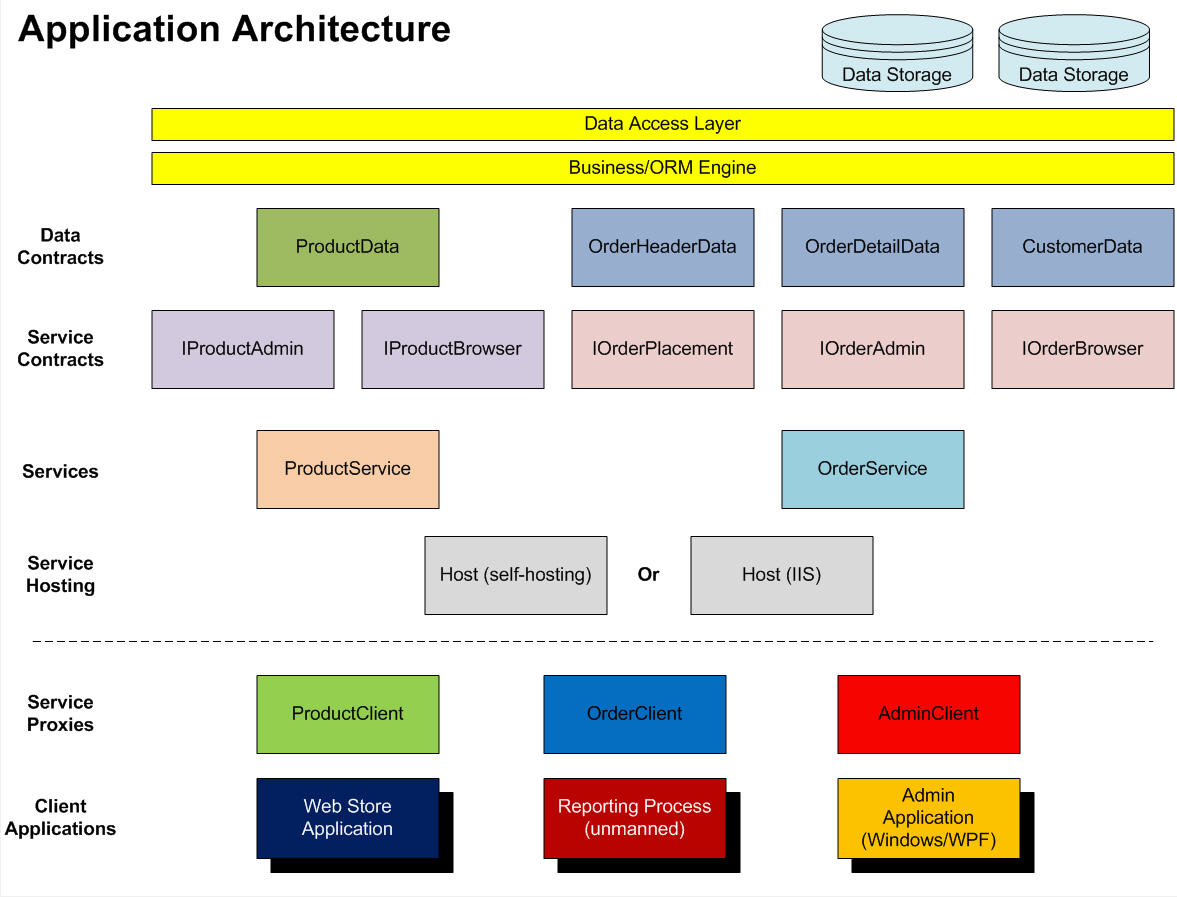
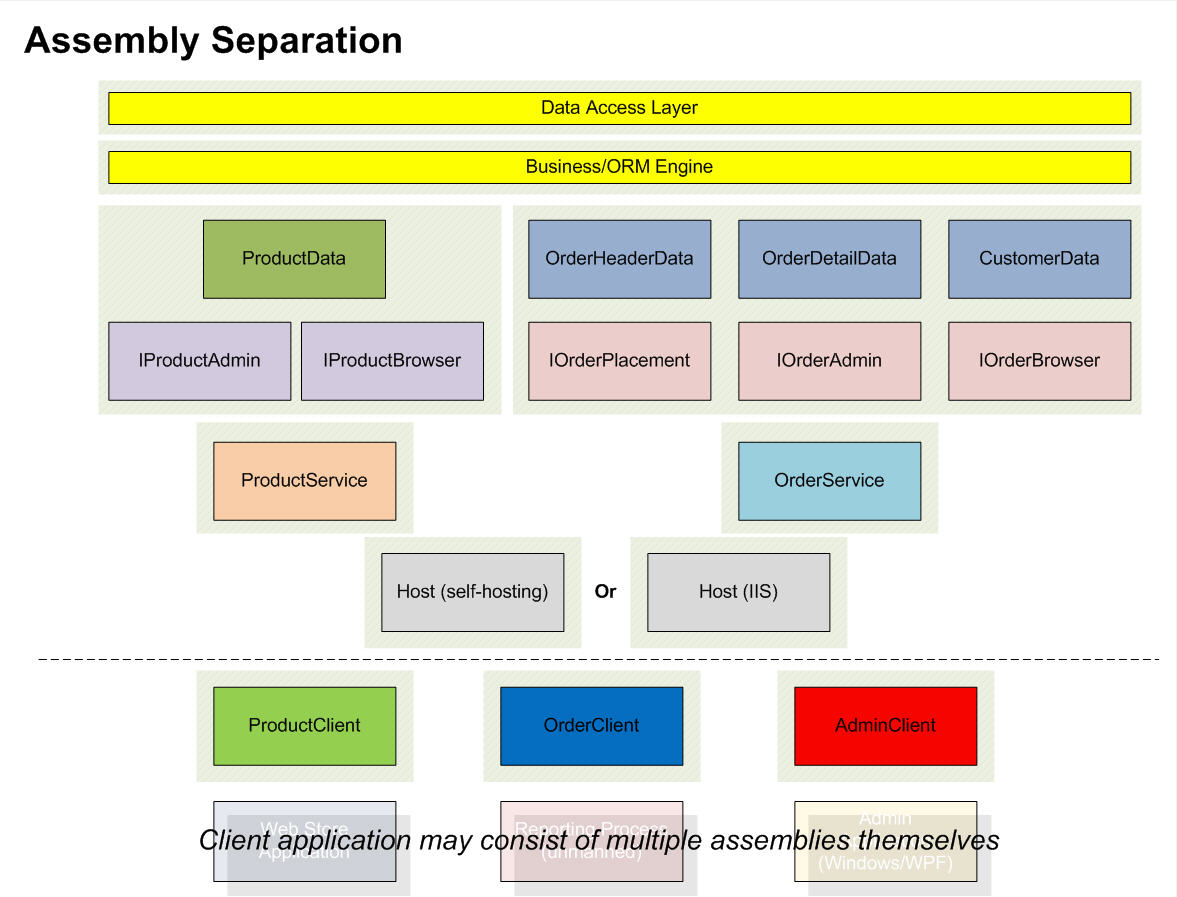
In order to illustrate all the concepts I’ve just described, I’m going to build a simple system with all the aforementioned components. Figure 2 and Figure 3 illustrate the application architecture and assembly separation that I’ll follow in the examples. The diagrams illustrate a more complete system model with both a Product service and an Order service. For the purposes of this article, I will concentrate only on the Product part of the system in order to not take over this issue of CoDe Magazine in its entirety. I also want to say, before someone freaks over my code, that in the interest of time and space I will not put any error handling or Fault Contract code in any of my examples. I take this as a given when developing any real application.
The Service Side
I’m going to code the service side of things first so you can see the detailed breakup of all my components.
Data Contracts
I’ll start at the bottom of the stack and design my data contracts first. Since I’m only going to concentrate on the Product side of the system, I’m only going to create one data contract called ProductData. This contract will contain data having to do with product information. For the purpose of the rest of this article, I’ll keep all my examples as simple as possible. I’ll place my data contract class into an assembly I’ll call Contracts, which will later contain my service contract as well. The ProductData class will use the DataContract and DataMember attributes that come from the System.Runtime.Serialization assembly that I must reference. You can see this class in Listing 2.
Service Contracts
My Contracts project will also contain my two product service contracts, IProductBrowser and IProductAdmin. In this example, I did not see the need to separate any of this out into more assemblies. IProductBrowser will contain operations that allow the browsing of a product catalog by defining operations that will signify the retrieval of a single product as well as an entire product listing. It will also contain operations for searching for products given some incoming information. IProductAdmin will contain operations for adding and maintaining the product catalog. The reason these two contracts are separated is because later you’ll see that service endpoints are defined on a per-contract basis. The separate contracts will allow me to control access on these two sets of operations separately. Listing 3 shows the full listings for these two service contracts. The ServiceContract and OperationContract attributes I’m using in these interfaces are defined in the System.ServiceModel namespace, which is part of another assembly I need to reference: System.ServiceModel.dll. Also notice that the ServiceContract attribute defines the name and unique namespace for my service contracts. True to the polymorphic nature of interfaces, these service contracts merely define the operations and that’s all that clients really need to know about (as the proxies will demonstrate later). My next project will contain the implementation details and will remain behind the services layer.
Services
It’s time for a new project; one that will contain my services. Besides the benefit of reusing my contracts from my client proxies later, separating them from this "services" project also allow me to create multiple implementations of each contract if I so desire.
My next project will be called Service and will reference not only System.ServiceModel but my Contracts assembly as well. This project will contain one service class called ProductService. Now here’s where it gets interesting. This service will provide implementations for both the IProductBrowser and IProductAdmin contracts, but this in no way means that a consuming client will be exposed to both sets of implementation, as you’ll see later. The implementation in this service will be the meat of my service and can call out to anything it needs to perform its functionality. In the interest of time and printed space I won’t provide a detailed implementation so you’ll have to settle for commented pseudo-code. It’s this layer of code that can call out to either another service and/or one or more business engines or ORM layers to perform its tasks and return information to the calling client. Listing 4 shows the code for the ProductService class.
Hosting
So let me recap where I am so far. I have my contracts (both data and service) in one assembly, which is referenced by my other project containing my service. I’m in good shape so far for contracts and I’ve also left myself open for any hosting scenario I want. I’ve chosen to create two hosting applications, one running under IIS and another as a console app demonstrating self-hosting.
I chose the two hosting scenarios so I can expose a public service using IIS in HTTP and a private service using TCP being hosted in the console application. Remember earlier I said that endpoints are created on a per-contract basis. You also saw that I split off my public and admin functions into two separate service contracts. Given this information, you can conclude that each service contract will need to be exposed using its own endpoint and can thus be exposed using its own host. I want to host the IProductBrowser contract using IIS and HTTP so I don’t have to deal with any firewall issues and can deploy as seamlessly as possible while allowing clients of any type, not just .NET WCF ones. The IProductAdmin contract will be exposed using a TCP host running in a console application since it will sit inside a firewall. This service will benefit from the speed of TCP and will only be consumed by .NET clients. I could have certainly chosen to host both service contracts using my IIS solution, but I would be limited to HTTP transport on a service that would not be public and can sit inside a firewall. You can probably already see the benefits of decoupling the hosts from the rest of the components.
I’ve created two more projects in my solution; one is a console app and the other is an ASP.NET application. Both projects will need to reference the System.ServiceModel assembly, as well as my Service and Contracts assemblies. Notice I didn’t create a WCF Service Application to serve as my host. I used a standard ASP.NET application and simply deleted the Default.aspx page, added my references, and cleaned up the web.config a bit. In this project, I will need an SVC file to serve as my service’s browsing point but I don’t want to create one using the "Add New Item" feature. That will over-bloat my web.config file and I just finished cleaning that thing up. Instead I added a text file item to my application and renamed it ProductService.svc. Unlike the "everything automatic" walkthrough I gave you at the beginning of this article, this SVC file will not have a code-behind file containing the service implementation. Remember, I already have that in my Service project which I referenced here. So instead, I’ll point this SVC file to my ProductService class by manually creating the directive:
<%@
   ServiceHost
   Service=
   "CoDeMagazine.ServiceArticle.ProductService"
%>
It’s important to note that the address of the service hosted here will be the URL corresponding to the deployment location of this web application, followed by ProductService.svc, but more about that in a minute. Right now let me switch over to the other host.
My console application is called Host and like all good console apps, starts with a class called Program and a static method called Main. Self-hosting a service simply means instantiating the System.ServiceModel.ServiceHost class, giving it the information about the service, and opening the host. The rest is all in the configuration (something my IIS host will need as well).
static void Main(string[] args)
{
    ServiceHost serviceHost =
       new ServiceHost(typeof(ProductService));

    serviceHost.Open();
    Console.WriteLine(
       "Service running. Please 'Enter'
        to exit...");
    Console.ReadLine();
}
Notice that the code for self-hosting is actually quite simple. The minimum information that the ServiceHost class needs is the type of service it will be hosting. Then all I have to do is call its Open method to start the host. At this point, the host is "listening" for service requests from consumers. The "console" code that follows is simply so the console application displays something on the screen then waits for ‘Enter’ to be pressed before dropping out and closing.
So now both of my service hosts have the knowledge of what service they will be servicing but not what contract and binding they will be exposing and using. Now let me talk about configuration. If I had created these hosts using the project templates, I would have been provided with a lot of configuration information that I could do without. I much prefer to create it all myself, starting with the bare minimum then adding what I need as I feel I need it.
The bare minimum a service needs in order to be hosted is the ABCs of WCF: an Address, a Binding, and a Contract. These three things make up a service’s endpoint and are defined in the <services> section inside the <system.serviceModel> section of the configuration file. I created two hosting applications, both hosting the same service, but each exposing a different service contract through a different binding. The ASP.NET hosting application’s configuration file will contain the following configuration:
<system.serviceModel>
    <services>
        <service name=
           "CoDeMagazine.ServiceArticle.
            ProductService">
            <endpoint
                address=""
                      binding ="wsHttpBinding"
                      contract =
                   "CoDeMagazine.ServiceArticle.
                    IProductBrowser" />
              </service>
          </services>
</system.serviceModel>
The console application’s configuration file will contain this configuration:
<system.serviceModel>
    <services>
        <service name=
           "CoDeMagazine.ServiceArticle.
            ProductService">
            <endpoint
               address =
                  "net.tcp://localhost:8002/
                   ProductBrowser"
               binding ="netTcpBinding"
                     contract =
                  "CoDeMagazine.ServiceArticle.
                   IProductAdmin" />
              </service>
          </services>
</system.serviceModel>
Notice that the ASP.NET app’s configuration does not have an address. That’s because earlier I said that the address of the service would be the deployment URL of the ASP.NET application followed by the name of the SVC file I added. The console app, on the other hand, does have an address in the configuration. Also notice the bindings each endpoint is using. The last part is the contract that each endpoint will expose. As I said earlier, the public HTTP service host will expose the IProductBrowser contract and its operations to either .NET or non-.NET consumers to do with as they please; while the more restrictive TCP service host will expose the IProductAdmin contract specifically to .NET consumers.
The Consumer Side
Now I’ll code the consumer side of the equation and show you the specific component breakup applies here as well.
Client Proxies
Client proxy classes are what a client application uses to connect to a service and use its operations. Along with copies of data and service contracts, client proxies are created automatically by using the "Add Service Reference" feature of Visual Studio, but with that also comes a lot of excess unneeded configuration. Besides, I went through the trouble of separating my contracts into their own assembly so I can reuse them. There’s also a utility that ships with .NET called SvcUtil that you can use to create proxy classes and contract copies given a services endpoint, but I find the same problem with the results here as I do with the "Add Service Reference" option. Not only will I create my client proxies manually, but I’ll put them into their own project called ClientProxies. This will allow me to reuse them from any client application I want. Depending on my needs, I can certainly create more than one proxy client project, but for simplicity purposes I’ll keep it at one project here; though I will have more than one class: ProductClient and AdminClient.
I’m going to use two different techniques to code these two proxy classes for reasons that I’ll explain as I go along. The ProductClient class will use the same technique that Visual Studio does when you use the "Add Service Reference" feature. The class first needs to import the System.ServiceModel namespace, which of course means that my ClientProxies project needs to reference the System.ServiceModel assembly. The ProductClient class will inherit from the ClientBase class and send into the generic argument the service contract I want this proxy to access; in this case, IProductBrowser. The result of this generic-oriented inheritance is that the Channel property of the ClientBase class will adopt all the operations of the IProductBrowser service contract. The next thing that the class needs to do is to implement the IProductBrowser interface in order to inherit its operations. Putting these two characteristics together, we get the following:
using System;
using System.ServiceModel;
namespace CoDeMagazine.ServiceArticle
{
    public class ProductClient
       : ClientBase<IProductBrowser>,
         IProductBrowser
    {
        #region IProductBrowser Members
        public ProductData GetProduct(
           Guid productID)
        {
            return Channel.GetProduct(productID);
        }
        public ProductData[] GetAllProducts()
        {
            return Channel.GetAllProducts();
        }
        public ProductData[] FindProducts(
           string productNameWildcard)
        {
            return Channel.FindProducts(
               productNameWildcard);
        }
        #endregion
    }
}
As you can see, the ProductClient class literally becomes a proxy to my service; an entry point into accessing my services implementation. Except for configuration, which will reside at the client application level, this is all there is to this technique of proxy class creation.
The second technique I’ll use is handy because as you can see, the ProductClient class inherits from ClientBase using up our one and only base class candidate. Since .NET only allows single-inheritance, I’m stuck with inheriting from this class if I want to access my channel. There may be situations where I want to set up an object model of my own and still have the ability of accessing a services channel, in which case I would want to inherit from a class in my object model and not the ClientBase class. Another situation where the previous technique would not suffice is if I want to create a proxy class to handle more than one service contract. Inheriting from the ClientBase class restricts this client proxy class to using only one service contract. Fortunately there is a way to obtain a service’s channel without automatically having a class like ClientBase create it for me.
What I’m going to do is use the ChannelFactory class to create a channel for me. When I instantiate this class, I send into it the service contract I want to represent as its generic argument, then call upon the CreateChannel method. The end result is a channel class returned as the type of the service contract interface I gave the ChannelFactory class. The variable I use to hold the results of this call can then be used to access my service contract’s operations. My proxy class can implement one or more service contract interfaces and I can use my channel object in the method implementations like this:
using System;
using System.ServiceModel;
namespace CoDeMagazine.ServiceArticle
{
    public class AdminClient : IProductAdmin
    {
        public AdminClient()
        {
            IProductAdmin productAdminChannel =
              new ChannelFactory<IProductAdmin>().
              CreateChannel();
        }
        IProductAdmin productAdminChannel = null;
        #region IProductAdmin Members
        public void UpdateProduct(
          ProductData product)
        {
            productAdminChannel.UpdateProduct(
              product);
        }
        public void DeleteProduct(Guid productID)
        {
            productAdminChannel.DeleteProduct(
              productID);
        }
        #endregion
    }
}
The idea here is that if I were implementing my entire architecture as illustrated in Figure 2, I would also have an OrderClient proxy class which would be used to access the operations on the IOrderPlacement service contract. However, I would like the IOrderBrowser and IOrderAdmin service contracts to be handled by the AdminClient proxy client, in which case I couldn’t inherit from ClientBase. Instead I would use the technique I’ve just illustrated and also implement the other two interfaces. I would, of course, have two more channel objects in the class.
Whether this is the ideal way of implementing this architecture can certainly be a topic for discussion, but my primary intent here was to illustrate examples of multiple techniques and reasons for using them.
Now that I’ve completed my proxy classes, I can compile this assembly and reference it from any client application I want. The client applications can instantiate my ProductClient and AdminClient objects and use their methods no differently than any other object they would use.
Client Applications
I’m not going to bore you and start talking details about how I would write my client applications, and besides I’d probably be insulting your intelligence. The important things to note are that any client applications I want can access any of my service contracts merely by referencing the appropriate client proxy assembly and instantiating its proxy classes. It’s as simple as that and I will leave you with one example. Besides, I still need to show you how to configure the client.
The client applications require not only references to the proxy assemblies but also some configuration information. The proxies are designed to access specific service contracts but the configuration will define where these contracts are found. The same way that service hosts expose endpoints in a <services> section, clients require these endpoint definitions in a <clients> section:
<system.serviceModel>
    <client>
        <endpoint address=
          "net.tcp://localhost:8002/
                    ProductBrowser"
                        binding ="netTcpBinding"
                  contract =
                    "CoDeMagazine.ServiceArticle.
                    IProductAdmin" />
        <endpoint address=
                    http://localhost:9224/
                    ProductService.svc
                        binding ="wsHttpBinding"
                  contract =
                    "CoDeMagazine.ServiceArticle.
                    IProductBrowser" />
          </client>
</system.serviceModel>
As you can see here, I’m defining two endpoints, one for each service contract. If you recall, each of these was implemented by the same service then hosted by two different hosting applications; so you can see the flexibility potential here.
If I want to use the operations defined in the IProductBrowser service contract, I simply need to instantiate whichever proxy class opens a channel to that endpoint. I this case, it would be the ProductClient class, and from here it’s simply a matter of accessing its methods as so:
ProductClient proxy = new ProductClient();
Guid productID = Guid.NewGuid();
ProductData product = proxy.GetProduct(productID);
MessageBox.Show("The product retrieved is: " +
                 product.ProductName);
From this code it’s clear that this object can indeed be treated like any other object with methods that you’ve used in the past. In fact you can take a proxy object like the one stored in the proxy variable above and use it in data binding. I constantly hear arguments against service-oriented architecture saying that it goes against object-orientation because it’s too procedural, or that you can’t use it in data binding, or that you can’t use business frameworks because most of them promote state and persistence and SOA does not. I’m here to tell you that this is absolutely NOT the case.
One of my areas of expertise is in the popular CSLA business framework developed by Rockford Lhotka. CSLA is a framework that offers much to both Windows and ASP.NET development, but due to the fundamental differences between these two platforms, lends itself to being more feature rich in a Windows platform. As an official CSLA instructor I often debate with students on the value of CSLA if they wish to implement a service-oriented architecture; their fears being that CSLA is designed to build business objects with advanced features like validation, authorization, and data binding. CSLA does indeed give you features like this but who says that the data-access portion of CSLA-based objects need to use ADO.NET (or a data-access-layer) in order for them to work? A CSLA business object’s data methods can create service channels using the ChannelFactory class, access a service to retrieve information, build the rest of the business object, and still benefit from all the features that the framework offers. The technique required in such a situation is the one that uses ChannelFactory because CSLA, like most business frameworks, gives you base classes from which to inherit so using the ClientBase class is out of the question. Perhaps that’s a topic for a future article .
Conclusion
Creating all the components of a WCF-based system manually is easy and allows for a more calculated design process, maximizing reusability and maintainability. Remember that assemblies should be logically grouped within a given category, meaning contracts, services, hosts, or proxies. But they should definitely not cover multiple categories; with the exception of data contracts and service contracts. Service orientation is not a replacement for object orientation or component orientation. Just like component-oriented architectures build on the principles of object-oriented programming, service-oriented designs use concepts of component design and bring other concepts on top of that; concepts like decoupled design, interoperability, and separation of concerns.
I hope I was successful in not coming across like I was bashing what Microsoft preaches for WCF and what Visual Studio does with it because I still think Visual Studio is the best IDE on the market and I think of WCF as one of the single greatest technologies ever to come out of our friends in Redmond.