



With Visual Studio 2008 and .NET 3.5, developer’s data access options have increased substantially.
In addition to using ADO.NET to create DataReaders or DataSets, Microsoft has added LINQ to SQL and Entity Framework as well as ADO.NET Data Services, which leverages those two. In addition to these new options, there are new syntaxes to learn. LINQ, which is built into Visual Basic and C#, has one implementation for LINQ to SQL and another for LINQ to Entities. In Entity Framework, you have the option to use LINQ to Entities as well as two other ways of querying with Entity SQL, as you can see in Figure 1.
In all, developers have gone from one “out-of-the-box” data access option plus a native query language of choice (e.g. T-SQL) to six different data access options along with some new query syntaxes to learn.
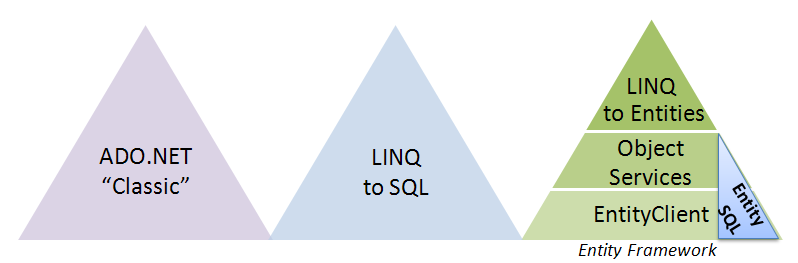
That sounds pretty scary. On the other hand, it offers the flexibility to choose the right tool for the job rather than have to constantly “make do” with the existing tools.
In comparing LINQ to SQL to the other options, it is important to keep in mind that it works only with SQL Server databases.
Because of the number of options to address, this article will focus on those that are native to .NET and Visual Studio. There are many third-party tools such as object relational mappers (ORM) and frameworks that you can use as well; but I won’t cover them in this article.
While it will be necessary to call out particulars of the different APIs, you should be able to benefit from this article without too much prior knowledge of, or experience with, LINQ to SQL or Entity Framework. However, this article is not aimed at teaching you how to use these technologies. I will focus on some of the most prominent differences between these options with the goal of giving you enough information to know which option makes sense for your scenario so that you can then drill into the appropriate technology and learn more.
I’ll base the examples in this article on unmodified versions of AdventureWorksLT and the Northwind database since they have familiar schemas for many readers.
Not All Databases Are Created Equal
The availability of database providers for a given data access option may impact your choice. There are myriad well-established data providers for ADO.NET-Microsoft providers such as SqlClient, OracleClient and OleDBClient as well as many written by third parties.
LINQ to SQL works only with SQL Server databases (2000+, Express, Compact 3.5). Matt Warren, one of the originators of LINQ to SQL, has a blog series on building IQueryable providers at http://blogs.msdn.com/mattwar.
Entity Framework can work with any database for which a provider exists. Microsoft has written the provider for SQL Server and included it with Entity Framework. As of late spring 2008, vendors have released into beta a number of providers that work with Entity Framework Beta 3, including Oracle, MySQL, PostgreSQL and a few IBM databases. David Sceppa at Microsoft is working with the provider writers and has a blog post listing who is currently working on the providers and when they should be available. See the sidebar, Upcoming Third-Party Providers for Entity Framework, for a link to his blog.
Entity Framework will not be able to support OleDB providers. The Entity Framework needs to transform its query expressions into an expression that will be recognized by a particular database. Since OleDB does not target a specific database, this isn’t possible.
What Does Your Data Access Code Interact With?
ADO.NET, LINQ to SQL, and Entity Framework all have different relationships to the data store.
ADO.NET-Work Against the Database
With ADO.NET you query the database directly, which means that you are required to have a very good understanding of the database schema. You must know the names of the stored procedures, views, and tables as well as the names and types of the parameters. Depending on how you handle the data upon return, you may also need to be well-versed in the schema of the return data. Strongly typed DataSets and TableAdapters make this significantly simpler because you can discover the schema through IntelliSense and they’ll take care of some of the connection functions for you.
LINQ to SQL-Work Against a Model that Is Essentially a Representation of the Database
LINQ to SQL queries are written against classes generated from the database. You can use a designer to do this work or code your classes manually.
Figure 2 shows a simple model built from three tables in the database. The existing one-to-many relationships were automatically identified by the designer.
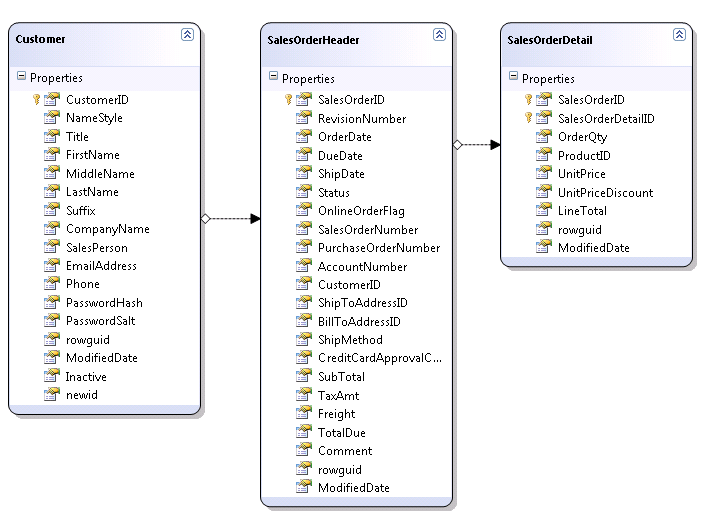
Behind the visual model is a set of classes and properties with attributes that point to the database tables and columns represented in the model.
You can see in the declaration of the SalesOrderDetail class that it is bound directly to the database table through an attribute.
<Table
 (Name:="SalesLT.SalesOrderDetail")> _
Partial Public Class SalesOrderDetail
The properties are tightly bound as well.
<Column _
   (Storage:="_SalesOrderDetailID", _
    AutoSync:=AutoSync.OnInsert, _
    DbType:="Int NOT NULL IDENTITY",_
    IsPrimaryKey:=True, _
    IsDbGenerated:=True)> _
Public Property SalesOrderDetailID() _
  As Integer
Writing LINQ to SQL queries is made simple not only thanks to the strongly typed classes, but the relationships between the classes are strongly typed as well.
While you can customize the model somewhat, the model is still a one-to-one representation of the database. Therefore, in effect, LINQ to SQL classes represent the database and when writing queries, it’s as though you are constructing strongly typed queries against the database. IntelliSense not only helps you with the operators (SELECT, WHERE, FROM, etc.) but with the tables and related data as well. You’ll see more about querying further on.
While the database model is essentially a representation of the database schema, there are some customizations possible, both cosmetic and structural. I’ll show this in more detail later when I compare the designers and model customization.
Entity Framework-Work Against a Conceptual Model that Maps Back to the Database
Entity Framework queries are written against a conceptual model called an Entity Data Model (EDM), as pictured in Figure3. The EDM is very different from the database model used by LINQ to SQL because it is loosely coupled to the database while the LINQ to SQL classes are tightly bound to the tables and columns in the target database.
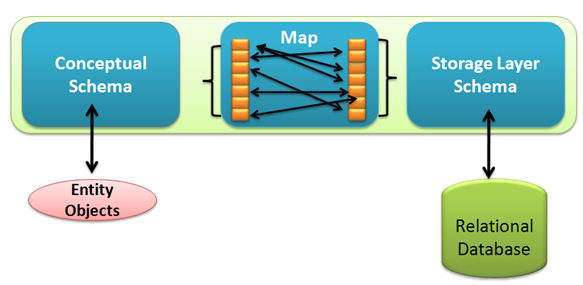
Figure4 shows the conceptual layer of an Entity Data Model in the Entity Framework designer that was created from the same three tables as the LINQ to SQL model.
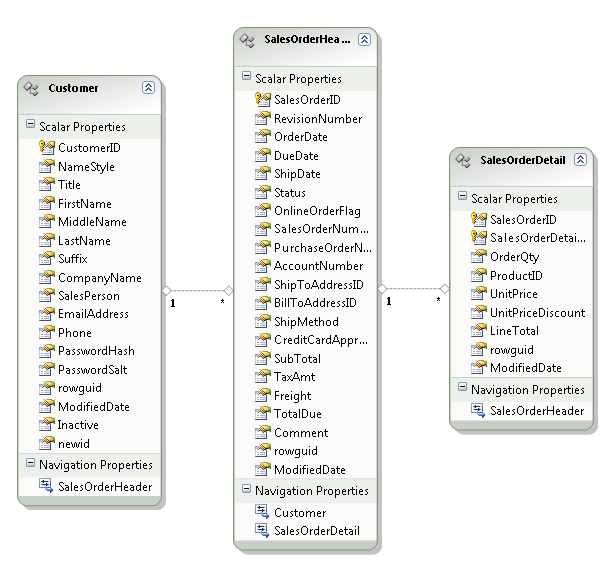
While the LINQ to SQL model is based on a set of classes, the EDM is based on XML schema files which are then used to automatically generate code classes.
Hands down, ADO.NET data readers are faster than LINQ to SQL or Entity Framework queries
The auto-generated classes are not bound to the database. Instead, they point back to the conceptual model and inherit from the EntityObject class. The code snippet below shows a representation of the SalesOrderDetail class. For clarity, I have removed some of the class attributes and Visual Basic’s requisite line-wrapping underscores.
<Global.System.Data.Objects
   .DataClasses.EdmEntityTypeAttribute
   (NamespaceName:=
      "AdventureWorksLTModel",
      Name:="SalesOrderDetail"), _
Partial Public Class SalesOrderDetail
   Inherits Global.System.Data.Objects
   .DataClasses.EntityObject
The properties also have attributes, but there is no mention of the database columns that they map to.
<Global.System.Data.Objects
   .DataClasses. _
   EdmScalarPropertyAttribute( _
   EntityKeyProperty:=true, _
   IsNullable:=false), _
Public Property SalesOrderDetailID() _
   As Integer
The Entity Data Model also contains an XML representation of the database and mappings that describe how entities and their properties map back to objects in the database. As with LINQ to SQL, lower level APIs transform Entity Framework queries into native queries in the database and then return DataReaders, which can be used directly or materialized into objects.
While it is possible to create an EDM that matches the database, EDM shines in scenarios where you can benefit by querying against a conceptual model that has been highly customized to match your business needs.
Additionally, because of the loose coupling, it is possible to use a single (well-defined) conceptual layer with different databases merely by creating a new store/mapping layer pair to act as a bridge. It’s not a walk in the park to do this, but can definitely be worth the effort if it solves your business needs.
Figure5 summarizes the layers of abstraction between the database and these three data access tools.
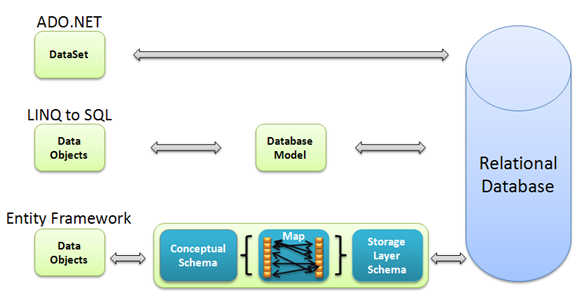
Differences in Creating the Models
Similar to the DataSet designer, LINQ to SQL’s design surface lets you drag tables, views and stored procedures directly from a DataConnection that is represented in Visual Studio’s Server Explorer. It identifies existing Primary Keys, Primary Key / Foreign Key relationships, and other constraints and builds them into the model.
You can easily add and remove objects from the model after the fact. However, if changes are made to the database, the model cannot automatically update itself. You will have to remove then re-add items to the model.
One very nice thing that the LINQ to SQL designer does is recognize that a class in the model is a single entity and therefore will automatically do its best job of making singular names out of any tables that have pluralized names. For example, Contacts becomes Contact. This is a default setting and can be turned off.
Entity Framework’s designer uses a wizard to build the model rather than the drag and drop scenario. The designer is also able to update the model from the database-selecting objects that you may not have selected the first time around or to update the schema when changes have been made to the data store. During this update, new fields in tables that already exist in the model are recognized and added as properties to the relevant entity. Most customizations to the CSDL will remain intact during an update; however, customizations that you may have made to the store schema (SSDL) will get overwritten during the update. Because I have been taking advantage of model customizations that can be made in the SSDL, this overwrite is definitely frustrating.
Additionally, the EDM Wizard does not currently have the ability to automatically fix the pluralization of entity names as they are created. This is one of the first things I do to a newly created model.
Customizing the DataSet, LINQ to SQL, and Entity Data Models
You can, of course, make modifications to the structures of the strongly typed DataSet, the LINQ to SQL model, and the Entity Data Model. The degree to which you can make these changes is vastly different and it is here that you can see the true power of the Entity Data Model.
Cosmetic Changes to Classes
There are some basic features that both models and the strongly typed DataSet allow. For example, you can rename any of the Entities/DataTables or Properties/DataColumns. That way when you are querying and working with the returned data, it is possible to use table and property names that make more sense to you. This is a great convenience without having to pester the DBA. You can also remove properties/columns and create keys and relationships in the DataSet designer, LINQ to SQL or EDM.
Inheritance
LINQ to SQL and the EDM both enable you to do something that is not possible in a database. You can build inheritance directly into the models. LINQ to SQL supports Table per Hierarchy inheritance (TPH) while Entity Framework supports TPH as well as Table per Type (TPT) and Table per Concrete Type (TPC) inheritance. Some recent blog posts and a sample on the ADO.NET Team’s code gallery page have popped up demonstrating how to pull off TPT inheritance in LINQ to SQL as well.
Table per Hierarchy (TPH)
TPH inheritance allows you to create a class hierarchy from a single table in the database.
The AdventureWorks’ SalesOrderHeader table has a Boolean field named OnlineOrderFlag. In both LINQ to SQL and the EDM, you can separate out the online orders as a separate entity which inherits from SalesOrderHeader. The method for doing this is a bit different in the two models, but the effect is the same.
Figure6 shows the WebOrder class, which inherits from SalesOrderHeaders in LINQ to SQL. The Inheritance object’s property window is also shown. The “OnlineOrderFlag” property is used to discriminate between regular SalesOrderHeader types and online orders. The base type, SalesOrderHeader, will be populated by orders with OnlineOrderFlag =False, while the derived type, WebOrder, is defined by OnlineOrderFlag =True. Unfortunately, Null cannot be used as a Discriminator value because the discriminator doesn’t have a way to represent “not-null”.
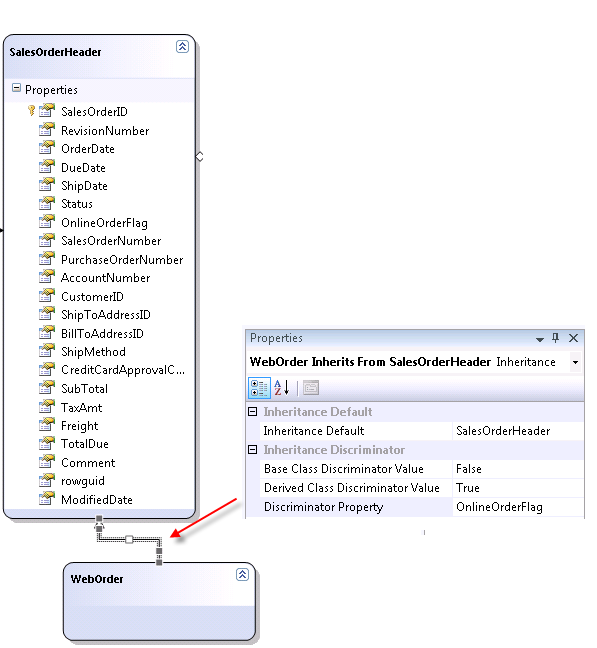
The base and inherited entities can be used in LINQ to SQL queries. For example, this Visual Basic query will return only WebOrders.
From weborder
In context.SalesOrderHeaders.OfType
   (Of WebOrder)()
Select weborder
When creating new WebOrder objects, the discriminator value will automatically be filled; when you insert the object, the OnlineOrderFlag will already be set to True.
With the Entity Data Model, the inheritance is built in nearly the same way, although EDM uses conditional mapping to differentiate between the base class and the derived class. See the sidebar, EDM Mapping and Inheritance, for a link to an article about mapping and inheritance in the EDM.
EDM’s Other Types of Inheritance
Table per Type (TPT) inheritance describes a scenario where there are multiple tables in the database that can be represented as base and inherited types in the Entity Data Model. A simple example of this would be a database with a Person Table and an Employees table that extends the data available in the Employees table, perhaps with fields such as Hire Data. In the Entity Data Model it is possible to create an inheritance relationship between the two.
Table per Concrete Type is a less common scenario, but it is also supported by the Entity Data Model. You’ll find this useful when a table with duplicate schema exists that contains a subset of data. For example, you may have a Product table accumulating so many discontinued products that the DBA split the discontinued products off into their own table. The mapping is still able to represent the DiscontinuedProduct entity type as inheriting from Product.
EDM has Additional Mapping Capabilities
The Entity Data Model supports other types of complex mapping as well.
Entity Splitting: It is possible to create an entity whose properties come from multiple tables that have one-to-one relationships; this is referred to as “splitting an entity”.
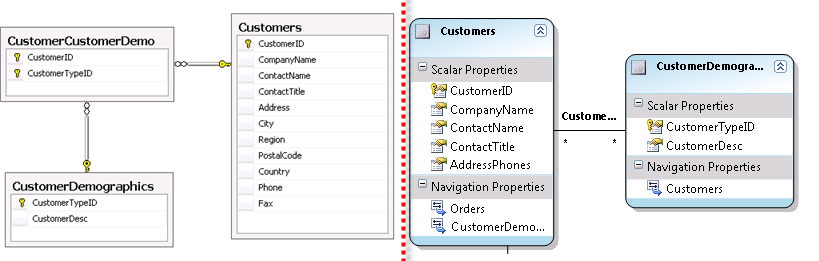
Complex Types: A ComplexType is used to define common properties among various entities. If you have a number of entities that each have address information, such as in Figure 7, you can create a complex type that encapsulates these properties.
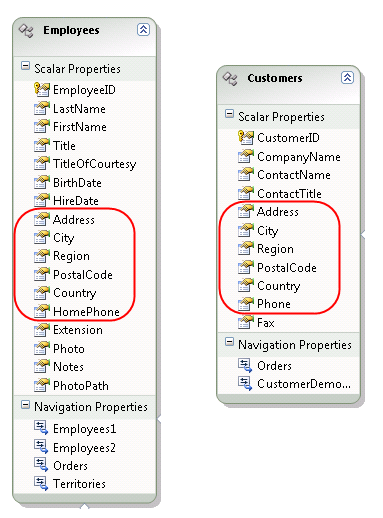
<ComplexType Name="CAddressPhone">
   <Property Name="Address" ...
   <Property Name="City" ...
   <Property Name="Region" ...
   <Property Name="PostalCode" ...
   <Property Name="Country" ...
   <Property Name="Phone" ...
   <Property Name="Fax" ...
</ComplexType>
Then you can use that type as a property for the entities in place of the scalar properties that it encapsulates.
<Property Name="AddressPhones"
          Type="Self.CAddressPhone"
          Nullable="false"/>
While the column names of the tables that these entities map to are different, the mappings resolve the differences. You can learn more about constructing and mapping complex types in the documentation.
Microsoft offers quite a number of other ways to customize an Entity Data Model. You can make some of these customizations in the mapping layer while you’ll make others in the layer that represents the datastore. The latter enables you to add “virtual” tables, views, and queries to the model that don’t truly exist in the data.
Unfortunately, some of the model customization possibilities did not make it into the current version of the designer. Complex types is one of these. You can add these customizations manually, but once they exist in the model, you won’t be able to open the model in the designer. There are a few that don’t prevent you from opening the model in the designer, yet they won’t show in the design view.
ComplexTypes and some of the other modeling features that are unsupported in the designer are ones which, even if they were supported in the designer, would not be as commonly used. But if you need the ability to customize your model to this level, it may be worth the effort.
Querying
Querying against the target database or model is very different in ADO.NET, LINQ to SQL, and the Entity Framework.
LINQ
LINQ wins hands down when it comes to writing queries, whether you are writing LINQ to SQL, LINQ to Entities or some other type of LINQ. LINQ’s strongly typed operators and functions as well as a slew of useful extension methods combined with the strongly typed objects produced by LINQ to SQL and Entity Data Model, make creating queries pretty easy.
LINQ to SQL Queries
With LINQ to SQL you must first instantiate a class that represents the model. This class is automatically created as part of the model and inherits from LINQ to SQL’s DataContext class. Through the DataContext, you can access the other classes. You can write LINQ queries against the model using LINQ to SQL syntax. LINQ to SQL then transforms your query into a T-SQL query, orchestrates the query execution, and plugs the resulting data into the model objects. The query isn’t executed until code is hit that requests the query be enumerated through.
The following example shows a query that returns OrderDetail objects for large orders where the customer received a discount. Notice that because LINQ to SQL is aware of the relationships between the tables, a JOIN is not necessary. You can simply traverse into the related data. The strongly typed classes make writing the query very easy with IntelliSense.
Dim context = New AWModelDataContext

Dim query = From detail _
  In context.OrderDetails _
  Where detail.Order.TotalDue > 1000 _
  And detail.UnitPriceDiscount > 0 _
  Select detail
Dim detailList=query.ToList()
The above query returns a List of OrderDetail types, an existing class in the model. It is also possible to project specific columns or functions in a query. As an example, you could replace the above Select clause with the following clause.
Select New With {.ID = _
   detail.Order.SalesOrderID, _
   detail.Order.AccountNumber, _
   detail. Order.TotalDue, _
   detail.UnitPrice, _
   detail.UnitPriceDiscount, _
   detail.LineTotal}
Note that the query syntaxes in VB and C# are slightly different. For example, the above query with the projection would look like this in C#:
from detail in context.OrderDetails
where detail.Order.TotalDue > 1000
      && detail.UnitPriceDiscount > 0
select new {ID =
detail.Order.SalesOrderID,
detail.Order.AccountNumber,
            detail.Order.TotalDue,
            detail.UnitPrice,
            detail.UnitPriceDiscount,
            detail.LineTotal};
Because the new type that is created by this projection does not exist in the model, LINQ will return an object that is an anonymous type. Anonymous types are another new language construct in VB and C# that enable you to create short-lived, strongly typed objects on the fly without having to define classes in advance.
LINQ to Entities Queries
The same simplistic query expressed against an EDM using LINQ to Entities looks no different, though this won’t always be the case. Instead of a DataContext, Entity Framework has a similar wrapper class called an ObjectContext. This wrapper is defined in the model and generated as a class. In my model, I’ve named it AWEntities.
Dim context = New AWEntities
Dim query = From detail _
  In context.OrderDetail _
  Where detail.Order.TotalDue > 1000 _
  And detail.UnitPriceDiscount > 0 _
  Select detail
Dim detailList=query.ToList()
LINQ to Entities queries that do projection will also return an anonymous type.
Object Services
Underneath the covers, LINQ to Entities leverages one of Entity Framework’s critical APIs, Object Services. It is Object Services that has the ability to send the query down the stack for execution, and then turn the results back into objects (aka “object materialization”).
You can write queries using Object Services directly with the ObjectQuery class. The ObjectQuery class does not use the LINQ to SQL syntax. Instead, it takes query expressions in the form of Entity SQL, a T-SQL like syntax that has been designed specifically for querying against the Entity Data Model.
Here is the same query again using an ObjectQuery. Because of the projection, again, an unknown entity is returned. Object Services cannot return anonymous types, so the objects returned are System.Common.dbDataRecords, which you can think of as being similar to a row in a DataReader. One major exception with this comparison, however, is that Entity Framework’s results can contain shaped data. While returned entities are a breeze to work with, dbDataRecords require extracting the record items one by one.
Using context = New AWEntities

   Dim eSQL = _
   "SELECT VALUE detail " & _
   "FROM AWEntities.OrderDetail " & _
   "AS detail " & _
   "WHERE detail.Order.TotalDue " & _
   ">1000 " & _
   "AND detail.UnitPriceDiscount > 0"

   Dim query = context.CreateQuery( _
      Of OrderDetail)(eSQL)
   Dim qlist = query.ToList

End Using
The “VALUE” keyword in the query is used when the query is designed to return a single value or object.
Alternatively, the projection used in the LINQ queries above would look like this in the Entity SQL:
Dim eSQL = "SELECT " & _
"detail.Order.SalesOrderID, " & _
"detail.Order.AccountNumber," & _
"detail.Order.TotalDue, " & _
"detail.UnitPrice," & _
"detail.UnitPriceDiscount, " & _
"detail.LineTotal " & _
"FROM AWEntities.Detail as detail "& _
"WHERE" &
" detail.Order.TotalDue > 1000 " & _
"AND detail.UnitPriceDiscount > 0 "
When using projections, rather than using CreateQuery of a specific type, the call would be:
Dim query = context.CreateQuery _
   (Of dbDataRecord)(eSQL)
Why Entity SQL?
Entity SQL has its roots in T-SQL with modifications made to enable working against an Entity Data Model. At first glance, compared to LINQ, it seems that it goes back to cave-dweller times. (No offense to those guys in the Geico ads.) You are back to writing strings and hoping that they don’t blow up at run time. So why would you ever want to use it?
You might find times that LINQ’s strong typing might lock you into a corner. LINQ depends on the CLR for its functionality; if you want to express a query that LINQ’s functions and providers won’t allow you can get stuck.
With LINQ to SQL, you can get around this by writing pass-through queries with ExecuteCommand.
In Entity Framework, you can step down to a lower level and use Entity SQL with Object Services. Because Entity SQL is string based you can do things like build query strings dynamically in code and you can use provider-specific query operators and functions in the string.
Here’s an example of an Entity SQL query that picks which properties to use in the projection. Given an array of desired properties, you can build the query string dynamically.
Dim arrayOfFields = New String() _
          {"FirstName", "LastName"}
Dim strFlds As New Text.StringBuilder
For Each fld In arrayoffields
   strFlds.Append("c." & fld & ",")
Next
'trim off last comma
strFlds.Remove(strFlds.Length - 1, 1)

Dim queryString = _
 "SELECT " & strFlds.ToString & _
 " FROM AWEntities.Customers AS c" & _
 " WHERE LEFT(c.lastname,1)='S'"
You can’t do this in LINQ to Entities or LINQ to SQL. I have heard that some people have been toying with functional programming to pull off something like this in LINQ, but it’s certainly not “out of the box easy”.
See the sidebar, LINQ to Entities vs Entity SQL for links to more on these differences.
EntityClient
The last of the APIs for Entity Framework, EntityClient, allows you to stream data back to the client without materializing objects. Instead, the results are returned in a DbDataReader. While this may be the least common scenario for many developers using the Entity Framework, it is a very important one for developers who want to leverage the modeling capabilities of the EDM but don’t need to use the features of Object Services. EntityClient uses Entity SQL as its query syntax.
Using the same Entity SQL projection query created above, this EntityClient query looks very similar to other ADO.NET provider queries.
Using. eConn As _
  New EntityClient.EntityConnection( _
  "Name=AWEntities")

 Dim eCmd As _
    New EntityCommand(eSQL, eConn)
 eConn.Open()
 Dim dr = eCmd.ExecuteReader _
    (CommandBehavior.SequentialAccess)
 For Each dbrec As DbDataRecord In dr
    Console.WriteLine _
    ("Acct #: {0}, " & _
     "Unit Price Discount: {1}", _
     dbrec.Item("AccountNumber"), _
     dbrec.Item(4))
 Next
End Using
Notice that you can use the index or the returned field name when iterating through the fields.
EntityClient as well as ObjectQuery have the ability to use query parameters, similar to how you can use SqlParameter and other dbParameters when building “classic” ADO.NET queries.
A Shaped DataReader
This is not your father’s DbDataReader, however. With ADO.NET, you are used to DataReaders that contain scalar data. EntityClient can return nested DataReaders, which means that your queries can easily result in nicely shaped data. There’s a great example in the Entity Framework docs (see sidebar, Reading through a Shaped EntityDataReader) of iterating through an Entity DataReader from a query that returns shaped data. The payload consists of scalar values, dbDataRecords, and nested dbDataReaders.
ADO.NET
Unless you are new to .NET, by now you are probably familiar with constructing queries in ADO.NET. Suffice it to say, queries are constructed using a string that is either the name of a stored procedure in the database or a dynamic query. You can create connections and commands and execute the queries manually or leverage some of the higher level tools such as TableAdapters and various DataSource object in .NET to automate some of this for you.
Change Tracking, Updates, and Concurrency
Because all of these data access options work with disconnected data, they support optimistic concurrency, which means that the database records do not get locked when they are accessed.
Who Owns the Change Tracking and State Info?
With respect to change tracking, there is a big difference between DataSets and their counterpart LINQ to SQL and Entity Framework objects. While all three provide change tracking, the DataSet is the only one that maintains its own state. When you persist or serialize a dataset or transfer it across process boundaries, its state data is included.
LINQ to SQL and Entity objects, however, do not contain their state information. Original values and state are maintained by the context which manages the objects. This proves extremely challenging for developers who are serializing and/or moving objects across tiers. If you want to leverage the simple mechanisms for saving changes (SubmitChanges in LINQ to SQL and SaveChanges in Entity Framework), you need the state of the objects and properties (modified? deleted? added?) for the changes to be persisted to the database. If your updates need to check for concurrent changes to the database (LINQ to SQL and Entity Framework both provide for this capability), you also need access to the original values.
There has been a lot of discussion and debate on the difficulty of handling this and the need for architectural guidance from Microsoft. Version 1 of LINQ to SQL and Entity Framework do not have any easy answers, though there are a number of people (including me) trying to help come up with patterns to use and others who have just thrown up their hands and want to wait for the next version. Third-party tools such as Ideablade’s DevForce for Entity Framework (in beta as of this writing) offer alternatives.
See the sidebars, Change Tracking Across Tiers in LINQ to SQL, and Change Tracking Across Tiers in Entity Framework for links to more on this very touchy topic.
EntityClient Is Read Only
Remember that EntityClient streams down read-only data. EntityClient is not able to perform updates.
Updates with Projections
In ADO.NET, if you are using the DataAdapter for updates, you can associate your own SQL command text to the UpdateCommand. That way, even if your strongly typed DataSets do not mirror tables in the database, updates can be handled fairly simply.
In LINQ to SQL and Entity Framework Object Services, updates using the SubmitChanges and SaveChanges methods only work with complete entities. You would have to leverage stored procedures to update data that is shaped any differently. With Entity Framework, there are a few ways to tackle this including creating entities that specifically match the projection.
Bulk Updates
Whether you are performing saves manually or with the provided tools (ADO.NET’s DataAdapter, LINQ to SQL SubmitChanges, and Entity Framework SaveChanges), each row insert/update/delete command is sent to the database individually.
ADO.NET 2.0 introduced two features to help with this. The dbDataAdapter.UpdateBatchSize property enables commands to be transmitted to the database in batches where they are then executed individually. The SqlBulkCopy class allows a SqlDataReader to be streamed to the server. While this class is designed for inserts, with a few tricks, you can get it to stream inserts, updates and deletes to the database. In ADO.NET 1.0 and 1.1, it is possible to execute SQL Server BULK INSERT statements with the Execute command.
LINQ to SQL and Entity Framework do not support bulk inserts.
LINQ to SQL’s ExecuteCommand does provide for pass-through queries so while you can’t do a bulk insert, you can do other types of bulk operations such as this canonical example:
context.ExecuteCommand _
("UPDATE Products SET UnitPrice=" & _
 " UnitPrice + 1.00")
These are important considerations when you need to upload lots of data at a time or make sweeping modifications to the database. This also introduces a scenario where you may want to mix these tools in a single application.
Alex James on the Entity Framework team has tried to attack these problems using Entity Framework in his blog, blogs.msdn.com/alexj.
Views and Stored Procedures
Both LINQ to SQL and Entity Data Model support views and stored procedures as does ADO.NET. The level of support, however, differs between the three.
Database Views
In LINQ to SQL and the Entity Data Model, database views are simply surfaced as read-only entities.
Dynamic SQL vs. Stored Procedures and Parameterized Queries
ADO.NET’s dbCommands make it easy to use either dynamic SQL or stored procedures with or without parameters.
By default, both LINQ to SQL and Entity Framework providers write all of their own dynamic queries for reading and writing data. For reads, you can use your own stored procedures (with caveats about simple updates if your sprocs return anonymous types) and you can override the insert, update and delete operations with pointers to your own stored procedures. This works pretty easily when the stored procedures parameters and returned structures map exactly to the entities with which you associate them, but once you step off this narrow line, things definitely get limited and tricky.
READ Stored Procedures
Stored procedures that perform READS are easily supported in both LINQ to SQL and EF models when the return value matches up with an entity in the model.
If the stored procedure returns something that is not an entity, the LINQ to SQL designer will automatically create a new class to match the schema of the results. This happens at design time. I would love to see the code that makes this happen! I’ll have to continue looking for the right DLL so I can poke around in it with Reflector.
The EDM doesn’t support this scenario as easily since it will be necessary to create an entity that matches the schema of the result set and additionally create a virtual table representation in the Store layer, then map the entity to the table. Unfortunately, the designer doesn’t do this and it requires manually modifying the XML of the model. It’s a bit of a pain to do and if you have a lot of READ stored procedures to implement in your model, this might make you unhappy. Hopefully we’ll see this magic worked out in the next version of the EDM designer.
Insert, Update, and Delete Stored Procedures
Both LINQ to SQL and EF support DML stored procedures for inserts, updates, and deletes. If these procedures exist in the database, they can be built into the model.
Insert, update, and delete procedures whose parameters match exactly to an existing entity can be used to override LINQ to SQL and Entity Framework’s default functions. LINQ to SQL has a little more flexibility as you can map a procedure and then customize it. That way if the procedure’s parameters don’t match exactly, you do have the ability to modify it.
In Entity Framework, you need to use EntityClient for DML stored procedures. Here’s an example:
Using eConn As New EntityConnection _
  ("Name=NWEntities")
  Dim eCmd As New EntityCommand _
     ("NWEntities.UpdCompName", eConn)
  eCmd.CommandType = _
     CommandType.StoredProcedure
  eCmd.Parameters.AddWithValue _
     ("CustomerID", cust.CustomerID)
  eCmd.Parameters.AddWithValue _
     ("CompanyName", cust.CompanyName)
  eConn.Open()
  eCmd.ExecuteNonQuery()
End Using
Looks pretty familiar, right? This is one of the nice things about working with EntityClient-it implements from the same classes as the other client providers.
On-the-fly Sprocs?
As you saw above, LINQ to SQL’s DataContext.ExecuteCommand makes pass-through queries simple to implement.
With an Entity Data Model, it is possible to build T-SQL for read-only queries directly into the model in cases where even the most intelligent and creative mapping cannot help you implement the query that you desire. This is done using an SSDL element called DefiningQuery. The result is similar to a read-only view.
There is a lot more to learn about stored procedures, but I have highlighted above some of the big differences for you.
Relationships
Relationships between CLR objects are as critical to application design as relationships are in the database. While ADO.NET has had its mechanism for relating DataTables since version 1, LINQ to SQL and Entity Framework add a brand new way of viewing and interacting with related data.
ADO.NET
With ADO.NET, you can query the database in any way you choose to pull down related data, then use a DataRelationship object to define parent-child relationships between in-memory DataTables. Strongly typed datasets make this a little less painful, but it is definitely cumbersome.
LINQ to SQL and Entity Framework
LINQ to SQL and the Entity Data Model define relationships between entities in the model. The relationships can be traversed when building queries either through projection or in filtering or other clauses.
LINQ to SQL handles related data simply as properties of one another. Entity Framework’s relationships are first class citizens in the model, called associations. The biggest challenges for related data in both LINQ to SQL and Entity Framework comes when you need to work across tiers where in many cases you need to have a good understanding of how to connect and disconnect classes from each other and from their context.
Saving Related Data
Doing inserts on PK/FK data in ADO.NET is a pain as you need to insert the parent, return the new key, then use that to insert the children. LINQ to SQL and Entity Framework make this a no-brainer task. If you create an order and some line items, they will all get inserted in the correct order. Both APIs will first insert the parent, grab the auto-generated Primary Key, and then use that key to perform the child inserts. All of this happens underneath the covers.
In this LINQ to SQL example, a SalesOrderHeader is created, then two Sales Order Details. Note that each detail gets its related SalesOrderHeader property set to the order that was already created.
Dim order = New SalesOrderHeader
  [code to fill order properties]
Dim detail = New SalesOrderDetail
With detail
  .OrderQty = 2
  [other properties]
  .SalesOrderHeader = order
End With
Dim detail2 = New SalesOrderDetail
With detail2
  .OrderQty = 5
  [other properties]
  .SalesOrderHeader = order
End With
Then a context is created and only the order object is inserted before SubmitChanges is called.
Using context = New AWModelDataContext
  context.SalesOrderHeaders. _
       InsertOnSubmit(order)
  context.SubmitChanges()
End Using
Taking a look at the SQL Profiler, you can see that three commands were passed in and executed. The first inserts the order and returns the store generated values, including the new Primary Key. Then there is one insert command for each SalesOrderDetail including the new primary key in the SalesOrderID field.
While it is coded a bit differently, Entity Framework does the same work on your behalf when saving related data.
Create Your Own Relationships?
By default, Primary/Foreign Key relationships and constraints in the database are represented in the model. You can additionally create relationships between entities in the database model even if the relationship has not been defined in the database as long as the fields exist to support this.
Entity SQL’s Navigation
Entity SQL provides a NAVIGATE operator which enables you to navigate from one entity to another even if there is no relationship defined. It’s not something that will get commonly used, but when you need it, it’s great to have.
Many-to-Many Relationships
Many-to-many relationships in LINQ to SQL rely on a joining table. Therefore, queries built across many-to-many relationships need to use joins.
In EDM, many-to-many relationships whose join table contains only the keys that define the relationships can eliminate the join table in the model. The join table and the necessary joins are handled behind the scenes with the mappings. This makes it very easy to navigate the relationship and build queries. You can even add data to the tables and Entity Framework will negotiate the necessary entries to the join table. If the join table has any additional columns in it, then you will need to have an entity in the model to represent that table and queries will be more complex, just as in LINQ to SQL.
Performance
Any time that layers of abstraction are introduced, you are going to trade ease of coding for performance.
Hands down, ADO.NET data readers are faster than LINQ to SQL or Entity Framework queries because ADO.NET connects directly to the database.
With LINQ to SQL and Entity Framework, there are a few processes that impact performance. The first is query compilation-the entire process of converting the LINQ or Entity SQL query into a native query that will be used in the data store. While this takes a lot of time, it is actually possible to pre-compile queries in both platforms and remove this performance hit completely for frequently used queries, even if there are parameters involved. See the sidebar, Performance: LINQ to SQL for a link to some resources for doing this.
Another hit is taken on the way back from the database when objects are materialized. You can see this in the Entity Framework by comparing EntityClient queries to Object Services or LINQ to Entities queries. Microsoft made some huge gains to the performance of materializing objects in Entity Framework throughout the betas and it is now nominal.
For updates, believe it or not, Entity Framework’s SaveChanges performs updates faster than DataAdapter.Update and much faster than LINQ to SQL’s SubmitChanges. While the results of my tests in this area have been confirmed by members of the Data Programmability team at Microsoft, I don’t know the details of why this is the case. I’ll include the results of some tests where I updated 450 records and inserted 10 new records with each of the above methods. The times are the averages of 100 runs of each test.
Table 1 comes from a recent blog post I wrote on this. You can find a link to the blog post in the sidebar, Performance: Entity Framework, to read more details.
Performance comparisons are a big topic and a bit of a tightrope, so for links to more details about this including some recent benchmark tests by Brian Dawson on the Entity Framework team, see the sidebar, Performance: Entity Framework.
One thing I haven’t come across is performance comparisons between LINQ to SQL and Entity Framework queries. Given some experiments that I performed, which are hardly lab-quality benchmark tests, as I expected the compiled LINQ to Entities queries were about the same speed as the compiled LINQ to SQL queries. The reason it makes sense is that in both cases the compiled queries has already created the T-SQL so they become even. You can see some of the results of my tests along with comparisons of update performance in my blog. Check the Performance sidebar mentioned above.
Other Frequently Highlighted Concerns
While these are not unimportant topics, there is just not room to cover everything, so I want to at least address these.
Security
The dynamic SQL used in LINQ to SQL and Entity Framework has been cause for the question, “What about SQL injection attacks?” LINQ to SQL and LINQ to Entities generate parameterized queries so this should not be a concern. Entity SQL queries do not get parameterized, so if you don’t use ObjectParameters or EntityParameters when building these queries, an injection attack is possible if you are constructing dynamic queries with user input. While it is actually difficult to write a SQL injection that will also be valid Entity SQL, it is possible. So, all of the usual caveats that apply to ADO.NET also apply to Entity SQL-when dealing with user input, validate user input, use query parameters when you can, etc.
Quality of Generated SQL
The quality of the SQL that is dynamically generated by Entity Framework and LINQ to SQL is another issue that is raised frequently. You always have the option to use your own stored procedures, but in the case of the dynamic SQL that is generated, all trust must be placed in the hands of the pros who are writing the APIs. In the case of the SQL Server API, members of the SQL Server team and in particular, the folks who work specifically with query optimization, have been very involved in working with the Data Programmability team on the query generation.
This doesn’t mean perfection, of course. Because of the nature of these tools, the query generation has to be generic enough to handle a wide variety of scenarios. Often the resulting query may look scary but in most cases, this doesn’t mean that the performance has been denigrated. For links to interesting discussions, see the sidebar, DBAs about LINQ to SQL and Entity Framework.
Test-Driven and Domain-Driven Development
LINQ to SQL and Entity Framework are not particularly friendly to test-driven development. While some have found ways to unit test LINQ to SQL, Entity Framework does not support unit testing. The biggest drawback in this respect is that Entity Framework classes must have some ties to the API objects. While it is possible to create custom objects in Entity Framework, in order for them to leverage relationship management and change tracking, they need to implement some key interfaces. This makes it difficult to separate the concerns in ways that are required by many who use domain-driven development, unit testing, etc. For some developers, there are also issues with the lack of implicit lazy loading in Entity Framework and the lack of complex types (Value Objects) in LINQ to SQL. If these are your preferred techniques, then you will be better off sticking with the current array of excellent ORMs that enable this type of development. The Data Programmability team has been listening to and learning from the DDD community and while they managed to get some interfaces into V1 to enable the use of custom classes, we should see major improvements in Version 2 in this area. See the Entity Framework and Persistence Ignorance sidebar for links to some of this conversation as well as the IPOCO sidebar, IPOCO Implementation for Entity Framework, for a link to an Entity Framework project written by a domain-driven developer.
Wrapping Up
This article has attempted to review some of the bigger areas of comparison between the key data access APIs in .NET 3.5: ADO.NET “Classic”, LINQ to SQL, LINQ to Entities, Entity Framework Object Services, and Entity Framework EntityClient. While some of the differences will be very useful to be aware of when you start coding, others may make the difference between choosing one technology over the other for certain scenarios or even for your entire organization.
ADO.NET “classic” may continue to be your data access tool of choice. You may find that with new applications that use SQL Server, LINQ to SQL is the perfect way to quickly get an application up and running without having to worry about a lot of implementation details. The ability of the Entity Data Model to provide a highly customized model to program against and leverage elsewhere in your enterprise may make Entity Framework your new best friend. Or you may even have learned that none of these options will be the silver bullet for you, but at least now you know!