


VSSDK Assist makes it easier to start extending Visual Studio using the Visual Studio SDK (VS SDK).
Creating packages with the Visual Studio SDK can get complex depending on the level of integration with Visual Studio, and VSSDK Assist is a toolset that makes getting started much easier.
This article will explore VSSDK Assist; an open source community-oriented set of tools that provides guidance, best practices, and code generation to support the creation of Visual Studio Extensibility SDK (VSX) components.
Creating a Package Solution
To start developing a package you first need to create a solution.
VSSDK Assist provides a Visual Studio solution template that is very similar to the one that comes with the Visual Studio SDK, but in this case it only targets the C# language and provides the ability to add a new package project to an existing solution.
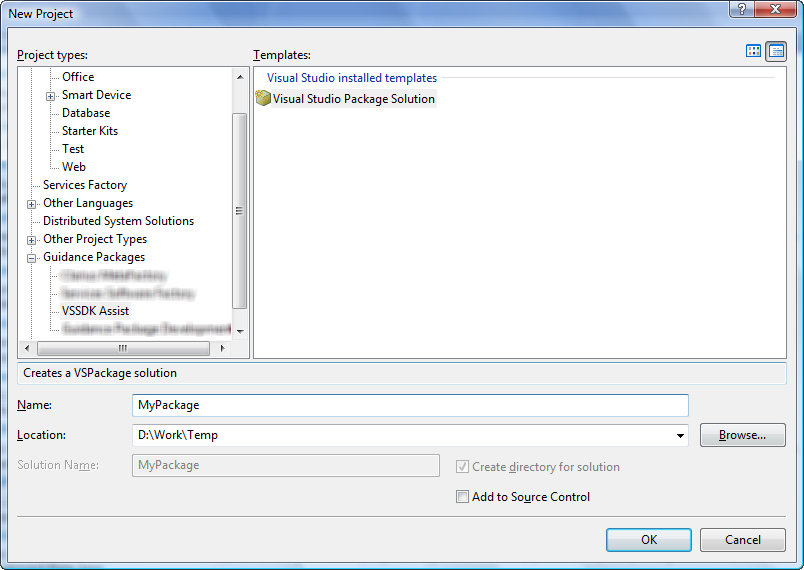
You can gain access to the Visual Studio solution template by selecting File > Add > New Project, and then by selecting the category for Guidance Packages > VSSDK Assist (Figure 1).
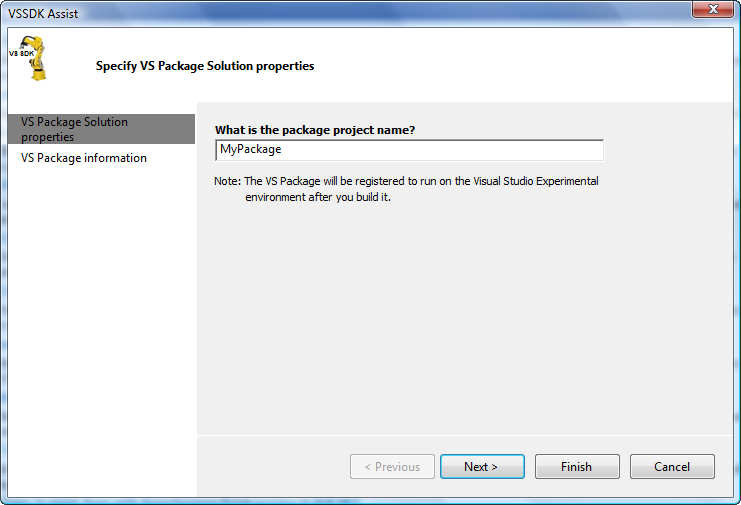
On the first page you need to specify the name of the project (Figure 2).
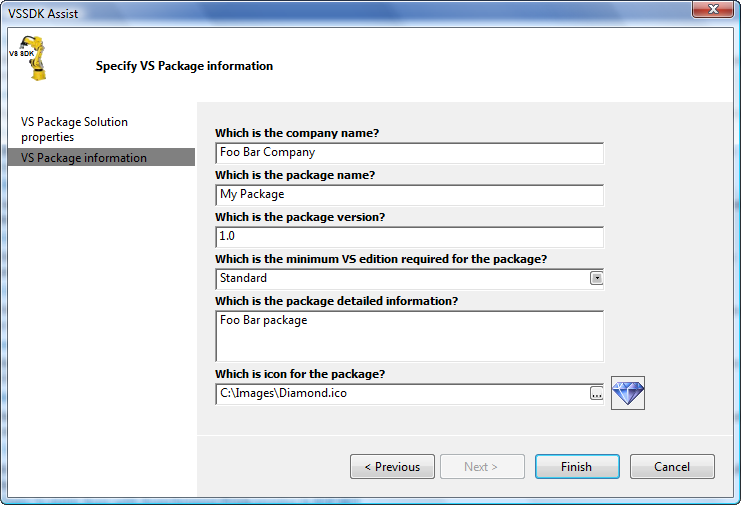
On the second page you need to specify common properties for the package such as company name, package name, package version, the minimum Visual Studio edition required to run the package, package description, and the icon for the Visual Studio splash screen and About dialog box (Figure 3).
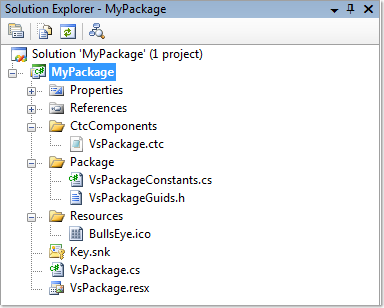
The solution structure that VSSDK Assist creates is very similar to the one that the template provided by the VS SDK creates. The difference is that the VSSDK Assist template automatically configures the debugging information for the project and enables VSSDK Assist on the solution (Figure 4).
In-context Guidance
VSSDK Assist provides in-context guidance for all the operations that you can perform.
Guidance and best practices are really an important thing for making Visual Studio easy to extend. There are different levels of guidance that VSSDK Assist provides, for example, via the guidance navigator (Figure 5), wizards, code snippets, and code generation.
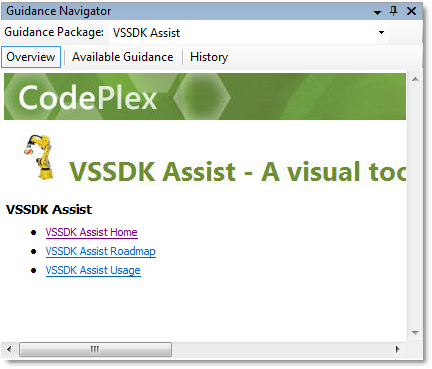
Each section on the guidance navigator has pointers to the VS SDK documentation file so if you click a link it will open the VS SDK documentation automatically.
If you want to create a service, under the VS Service section you will see all the related links for that specific operation such as services general documentation, how to provide a service, and how to consume it (Figure 6).
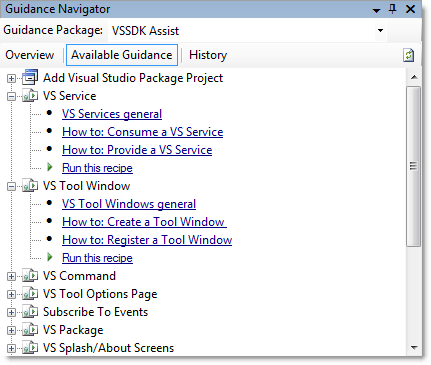
Creating a Tool Window
A tool window is a window integrated with Visual Studio that you can use to display information and to perform any other operations. Examples of tool windows are the Solution Explorer, Properties window, and Team Explorer window.
tool windows have two areas: a frame and a pane. VSSDK Assist uses the frame to control the size, location, docking style, and orientation among other properties. The pane can host a .NET user control that contains the functionality of the tool window.
To create a tool window you need a class that inherits from Microsoft.VisualStudio.Shell.ToolWindowPane and a class that is the .NET user control that will be hosted inside the tool window pane (Listing 1).
After you create a tool window you need to register it within Visual Studio by using the corresponding .NET attributes that are part of the Manage Package Framework (MPF) and you need to set the persistent properties of the tool window frame (Listing 2).
VSSDK Assist automates the creation of tool windows by just executing a wizard.
On the first page you need to specify the destination folder for the files that VSSDK Assist will generate, the name of the Tool Window, and the name of the user control (Figure 7).
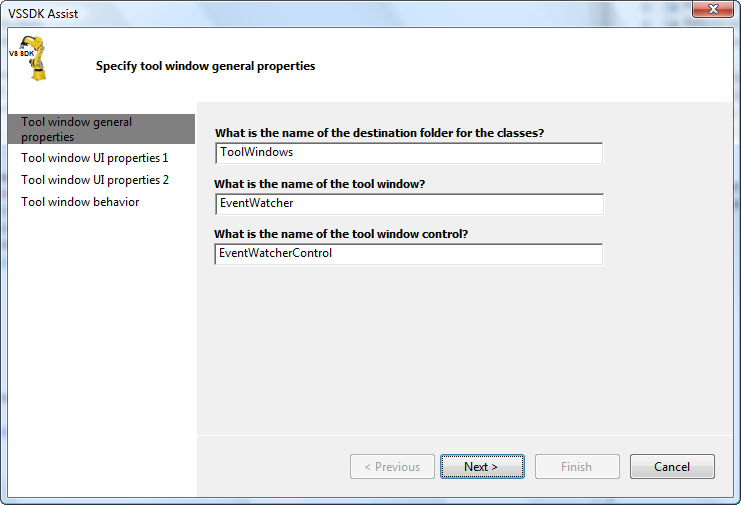
On the next page you need to specify the title of the tool window and the icon to be rendered (Figure 8).
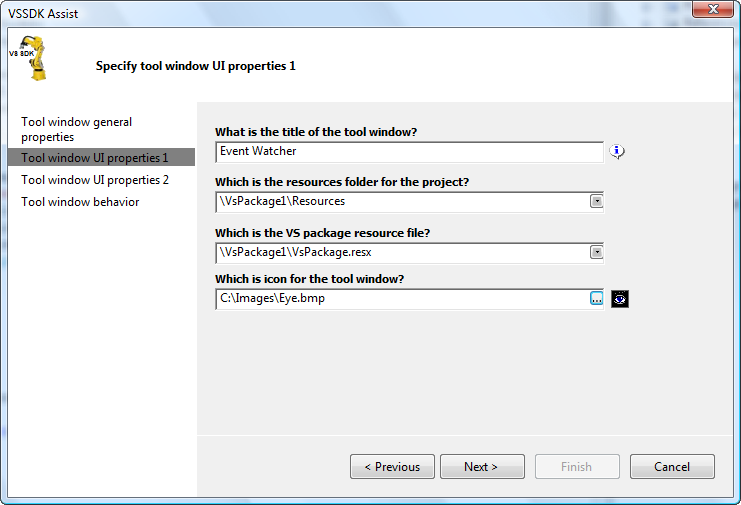
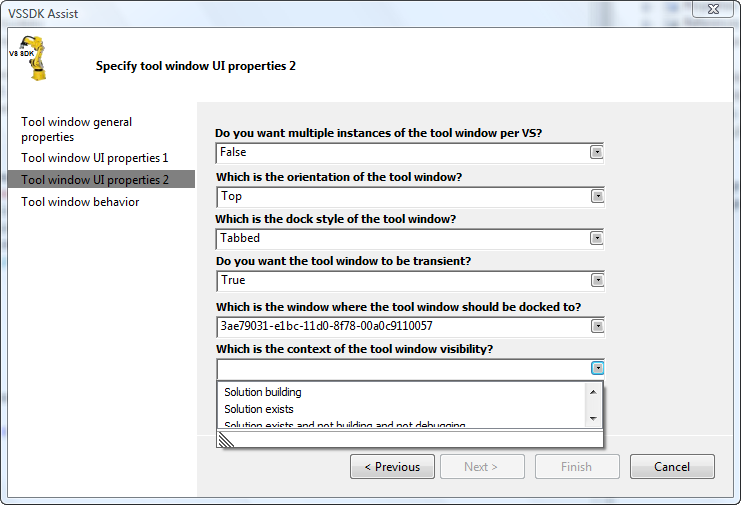
On the last page you need to specify the UI properties of the tool window such as orientation and dock style. There are two particular properties where VSSDK Assist also offers guidance. One is the window that the tool window docks to in Visual Studio and the other is the context of the tool window visibility. These properties are GUIDs that are part of the Microsoft.VisualStudio.Shell.* assemblies.
Without VSSDK Assist you would need to know about these GUIDs and where to look for them (Figure 9).
Creating a Command
A command is an operation that performs a task. They are usually graphically represented by menus and toolbars. Examples of commands are File > New > Project and Tools > Attach to Process.
A command has an event handler associated with it. The event handler controls many aspects of the command, for example its caption, when it is visible or enabled, and, most importantly, it ensures that the command responds appropriately (“routes”) when activated (Listing 3).
You also need to define the graphical representation of the command. This is the trickiest part because you need to know about Command Tables Configuration (CTC) files.
CTC files define the way menus and toolbars populate with groups of command items. They are defined in a C/C++ fashion (Listing 4).
Unfortunately there is no “CTC editor” that will help you when writing these kind of files; to write them you need to know about GUID:ID pairs.
Each available command, command group, and menu is identified by a unique GUID:ID pair.
If you want to add a menu item for a command on the Tools menu, you need to know the GUID:ID pair for that particular menu. This means digging inside C/C++ header (“.h”) files that are part of the Visual Studio SDK. This process can get very frustrating and is prone to errors.
VSSDK Assist automates the creation of commands making them intuitive and easy to create. Let me walk you through how to use VSSDK Assist to create a command for a menu item.
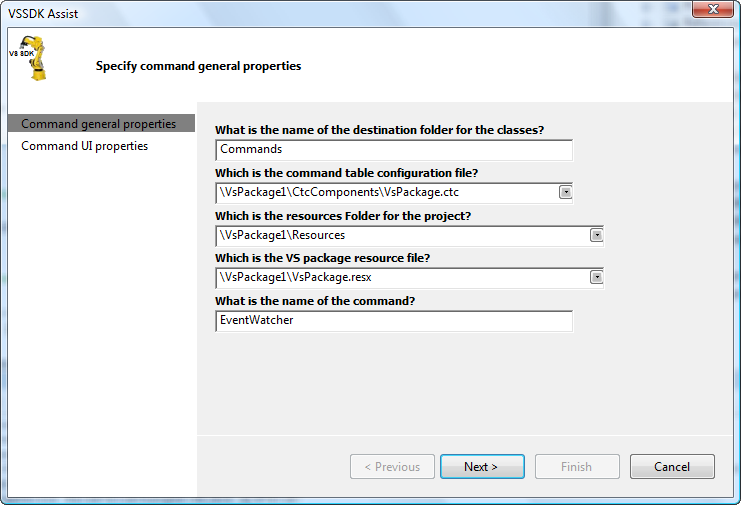
On the first page you need to specify the destination folder of the files that VSSDK Assist will generate, the main CTC file for the package, and the name of the command.
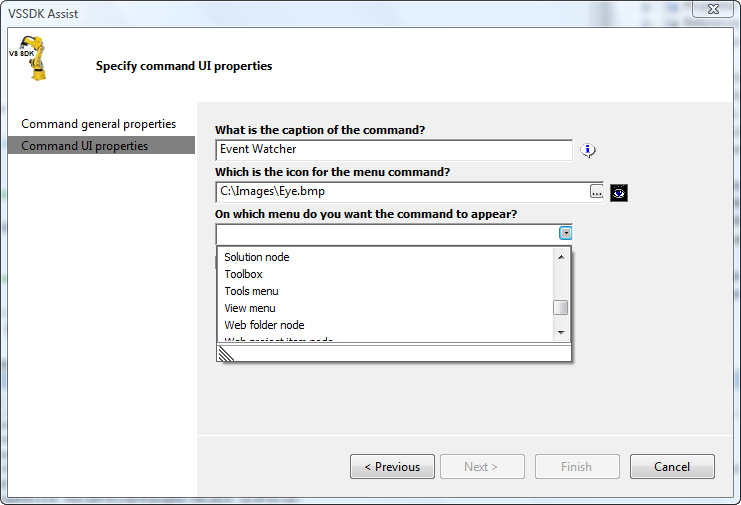
On the second page you need to specify the caption of the command, the icon to be rendered on the menu/toolbar, and, the most important piece of information, the GUID:ID pair.
VSSDK Assist comes to the rescue and provides a list of the most common Visual Studio menus so you can choose the corresponding menu from the list (Figure 11).
VSDDK Assist automatically updates the CTC file with the command definition, creates the .inc and .h files that are referenced from the CTC file, and creates the command event handler.
Creating a Service
A service is an API that you can access by using packages. Basically one package exposes a set of interfaces and another package consumes them. A service is a contract that allows the communication between packages. Creating a service involves the creation of two interfaces and an implementation class (Listing 5).
After you create a service you need to register it to make it available for consumption by other packages (Listing 6). This is not a difficult task from the developer’s point of view, but is really common and repetitive, so VSSDK Assist automates the creation of services.
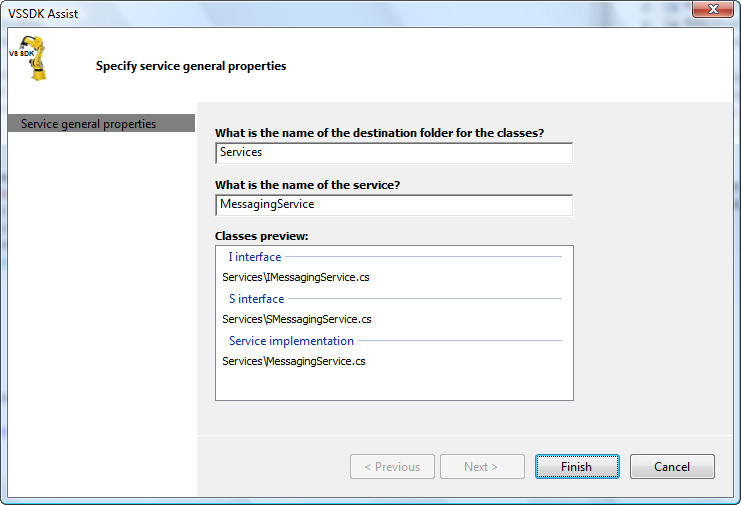
After specifying the destination folder for the files to be generated and the name of service, VSSDK Assist automatically creates the interfaces, the implementation class, and the service registration information (Figure 12).
VSSDK Assist Features Listing
So far so good, but I have reviewed only a couple of features that come with VSSDK Assist. The following list includes all the operations that you can perform with VSSDK Assist. I’ve divided them into five main categories:
Create
- Create a package solution
- Add a package project into an existing solution
- Create services
- Create tool windows
- Create commands and menu items
- Create tool options pages
- Create language services
- Create custom projects
- Create custom projects property pages
- Create custom tools or single file generators
- Subscribe to Visual Studio events
Configure
- Configure package metadata
- Configure Visual Studio About dialog box and splash screen
Deploy
- Configure package load key (PLK)
- Create package deployment information (.reg or .wix)
Test
- Create package load key report
- Test package load key on Visual Studio
- Test Visual Studio splash screen
Utility
- Register package under experimental hive
- Unregister package under experimental hive
- Refresh package registration information under experimental hive
- Launch Visual Studio under experimental hive
VSSDK Assist Prerequisites
The current version of VSSDK Assist targets Visual Studio 2005. To start using it you need to have the following prerequisites:
- Visual Studio 2005 (Professional/Team Suite)
- Visual Studio 2005 SP1
- Visual Studio 2005 SP1 Update for Windows Vista
- Visual Studio 2005 SDK v4
- Guidance Automation Extensions Feb 07 CTP
Conclusion
I hope this article has given you an insight into the features and possibilities of VSSDK Assist and the importance of having authoring tools that allow you to easily extend and customize Visual Studio.
For more information about VSSDK Assist you can visit http://www.codeplex.com/vssdkassist/ and my blog at http://clariusconsulting.net/pga
Listing 1: C# code for tool window implementation
 [Guid("4DAC3425-2F6D-4A22-AC99-B84653384C62")]
public class EventWatcher : ToolWindowPane
{
   private EventWatcherControl control;

public EventWatcher() : base(null)
{
   this.Caption = "Event Watcher";
      this.BitmapResourceID = 24765;
      this.BitmapIndex = 0;
   control = new EventWatcherControl(this);
   }

   override public IWin32Window Window
   {
      get{return (IWin32Window)control;}
   }
}

public partial class EventWatcherControl : UserControl
{
   IServiceProvider serviceProvider;

   public EventWatcherControl() : this(null)
   {
   }

   public EventWatcherControl(IServiceProvider provider)
   {
      this.serviceProvider = provider;
      InitializeComponent();
   }
}
Listing 2: C# code for tool window registration
 [ProvideToolWindow(typeof(EventWatcher),
   MultiInstances = false,
   Style = VsDockStyle.Tabbed,
   Orientation = ToolWindowOrientation.Top,
   Transient = true,
   Window = "{3ae79031-e1bc-11d0-8f78-00a0c9110057}")]
[ProvideToolWindowVisibility(
   typeof(EventWatcher),
   "{f1536ef8-92ec-443c-9ed7-fdadf150da82}")]
public sealed class MyPackage : Package
{
   private void ShowEventWatcher(object sender, EventArgs e)
   {
      ToolWindowPane window =
         this.FindToolWindow(
         typeof(EventWatcher), 0, true);

      if((window == null) || (window.Frame == null))
      {
         throw new COMException("Can not create window.");
      }

      IVsWindowFrame windowFrame =
         (IVsWindowFrame)window.Frame;

      ErrorHandler.ThrowOnFailure(windowFrame.Show());
}
}
Listing 3: C# code for command registration
public sealed class MyPackage : Package
{
protected override void Initialize()
{
   base.Initialize();
   AddEventWatcherHandler();
}

private void AddEventWatcherHandler()
{
   OleMenuCommandService menuCommandService =
         GetService(typeof(IMenuCommandService))
         as OleMenuCommandService;

   if(menuCommandService != null)
   {
      CommandID menuCommandID = new
      CommandID(EventWatcherConstants.guidEventWatcher,
      (int) EventWatcherConstants.cmdidEventWatcher);

      OleMenuCommand menuItem =
         new OleMenuCommand(
            new EventHandler(
               EventWatcherCallback),
               menuCommandID);

      menuCommandService.AddCommand(menuItem);
   }
}

private void EventWatcherCallback(object sender, EventArgs e)
{
   //TODO: Provide Implementation
}
}
Listing 4: ctc definition
#include "stdidcmd.h"
#include "vsshlids.h"
#include "msobtnid.h"
#include "..\Package\VsPackageGuids.h"
#include "..\Commands\EventWatcherIds.h"
#include "..\Commands\EventWatcherGuids.h"

#define OI_NOID guidOfficeIcon:msotcidNoIcon
#define DIS_DEF DEFAULTDISABLED | DEFAULTINVISIBLE |
  DYNAMICVISIBILITY
#define VIS_DEF COMMANDWELLONLY

CMDS_SECTION guidVsPackagePkg
  NEWGROUPS_BEGIN
guidEventWatcher:grpidEventWatcherGroup,
guidSHLMainMenu:IDM_VS_MENU_TOOLS,
0x0100;
  NEWGROUPS_END
  BUTTONS_BEGIN
guidEventWatcher:cmdidEventWatcher,
guidEventWatcher:grpidEventWatcherGroup,
0x0100,
guidEventWatcherBitmap:1, BUTTON,
,
"Event Watcher";
  BUTTONS_END
  BITMAPS_BEGIN
guidEventWatcherBitmap:bitmapidEventWatcher, 1;
  BITMAPS_END
CMDS_END
Listing 5: C# code for service implementation
 [Guid("9640A064-FB68-4353-ADEE-AD7B7A8E9219")]
public interface SMessagingService
{
}

[Guid("633E33E6-7AF4-4815-AC72-BB1E73A7CD33")]
[ComVisible(true)]
public interface IMessagingService
{
string GetVSSDKAssistMessage();
}

internal class MessagingService:
IMessagingService, SMessagingService
{
public string GetVSSDKAssistMessage()
{
   return "Hello VSSDK Assist";
}
}
Listing 6: C# code for service registration
 [ProvideService(
typeof(SMessagingService),
ServiceName = "MessagingService")]
public sealed class MyPackage : Package
{
protected override void Initialize()
{
   base.Initialize();
   (this as IServiceContainer).AddService(
   typeof(SMessagingService),
   new ServiceCreatorCallback(CreateMessagingService),
   true);
}

private object CreateMessagingService(
   IServiceContainer container,
   Type serviceType)
{
   if(container != this)
   {
      return null;
   }

   if(typeof(SMessagingService) == serviceType)
   {
      return new SMessagingService();
   }

   return null;
}
}